Empyrion - Galactic Survival

Empyrion - Galactic Survival

评价数不足
MULTV07 Argentavis MPTC with Personnel Module
   
奖励
收藏
已收藏
取消收藏
Blueprint: Small Vessel
Custom: Airtight
标签: Blueprint
文件大小
发表于
更新日期
500.723 KB
2024 年 8 月 19 日 下午 2:08
10 月 2 日 下午 4:29
3 项改动说明 ( 查看 )

订阅以下载
MULTV07 Argentavis MPTC with Personnel Module

在 Wimpoman 的 1 个合集中
Military Utility/Logistics/Transport Vehicles Series by Wimpomanufacturing
18 件物品
描述
Please note: of the 7 generators, only 2 come on by default. 2 more large and a small are turned on by the "WeaponsShields" Device Group Shortcut (along with the shield itself) - meaning that, when turning the shields on using your normal keybind, it won't have enough power to charge and the generators (and a lot more) might go bang. If you don't like this, please feel free to move the 3 generators found in the "[1]Power - Shield" device group into the "[1]Power - Main" device group.

Mod/Scenario - None (Vanilla)


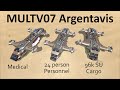
The seventh in my series of Military Utility/Logistics/Transport Vehicles is the Argentavis class Multi Purpose Transport Craft.
This variant of the Argentavis class has a Personnel Module with 24 Passenger Seats.


Door Operation:
Outer Doors - Airlock = Manual, Personnel Module = Automatic (motion sensor controlled).
Inner Doors - Automatic (motion sensor controlled).

Upgrade/Adaptability Space
None

Alternate Paints
As shown in the above screenshots, the colour palette includes 4 primary colours to choose from: Khaki Tan (vehicle comes in this colour); Camouflage Green; Light Blue-Grey; Dark Blue-Grey. To swap the colour, simply click on the "Replace Mode" check box on the Colour And Texture Tool's UI, then (ensuring that no texture is selected) click on the coloured square that you want to change to, then "fire" the Colour & Texture Tool at any part of the vehicle that is painted the colour you want to replace.


The Argentavis is loosely based upon the ISSCV from Space: Above & Beyond.

- NOTE - any Mini Fridges on board come turned off by default to save power until food is inside needing to be kept cold, and can only be turned off manually (or by turning off all power to the vehicle) from the fridge's own UI to limit instances of food being accidentally spoiled.

Video - How To Turn Off Wimp's Blinking Lights

(Clicky linkies)
Other related Wimpomanufacturing workshop entries
Variants of this build:
MULTV07 Argentavis with Cargo Module
MULTV07 Argentavis with Medical Module
Builds adjacent in the line/series:
MULTV06 Buffalo 128kSU Logistics Truck
MULTV08 Quetzalcoatlus Mechanised Dropship
Other Personnel transport SVs/Troop Dropships by Wimpomanufacturing:
MULTV09 Giant Marabou Troop Dropship
MULTV11 Dimorphodon class Shuttlepod
MULTV12 Osteodontornis class Shuttle
WM01 Starter class Shuttlepod
WM02 Initiate class Shuttle
WM02 Initiate class Personal Shuttle
Wimpomanufacturing Info:
Wimpomanufacturing 'Terms, Definitions and Conventions' Guide.