Empyrion - Galactic Survival

Empyrion - Galactic Survival

评价数不足
AFHV02 Caracal Pickup
   
奖励
收藏
已收藏
取消收藏
Blueprint: Hover Vessel
Custom: Airtight
标签: Blueprint
文件大小
发表于
443.686 KB
2024 年 6 月 4 日 下午 4:42
1 项改动说明 ( 查看 )

订阅以下载
AFHV02 Caracal Pickup

在 Wimpoman 的 1 个合集中
Armoured Fighting Hover Vehicles Series by Wimpomanufacturing
19 件物品
描述
Mod/Scenario - None (Vanilla)


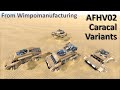
The second in my series of Armoured Fighting Hover Vehicles is the Caracal.
This variant of the Caracal is a Pickup... a 2-person military vehicle with the primary purpose of supply transport.
Since the Caracal is relatively small, its equipment list is rather limited.


Construction
Body = Hardened Steel
Deck Plating = Hardened Steel
Windows = Armoured glass (Armored Windows S).
Armour = Combat Steel
Core Placement = Centreline, in rear (behind ammo container).
Resource Costs = 294 Iron; 250 Copper; 246 Carbon Substrate; 229 Silicon; 222 Titanium Rods; 62 Cobalt; 45 Sathium; 5 Neodymium.

Equipment
Life Support:
Pressurisation = 2 Small O² Tanks; 1 Ventilator; no Compartmentalisation.
Personal Facilities = None.
Medical Devices = None.
Seats = 1 Driver's (Cockpit) Seat; 1 Passenger Seat.
Power Grid:
Primary Power Plant = 1 small Generator.
Secondary/Emergency Power = No redundancy.
Fuel Stores = 8 small Fuel Tanks.
Mobility:
Handling Profile = Generic
Manoeuvrability = 35m/s² Forward; 18m/s² Reverse; 18m/s² Lateral
Agility = 42deg/s Yaw; 7deg/s Pitch; 15deg/s Roll
Main Propulsion = 4 medium T2 Forward Thrusters; 2 medium T2 Braking/Reverse Thrusters; 2 medium T2 Lateral Thrusters (on each side); 4 small Hover Engines.
RCS Gyros = None.
Max Lift = 2 additional small Hover Engines.
High G Functionality = Can operate in 4G (can lift ~30.5t in 4G with Max Lift enabled, vehicle mass = 20.9t)
Weapons & Defences:
Shields = None.
Fixed Weapons = None.
Point Defence Turrets = 1 Gatling Turret, targeting: Ground Troops exc. Predators; Drones; Weapons & Turrets of SVs.
Resource Gathering:
None.
Storage:
Ammunition = 1x 375 SU Ammo Container.
Cargo = 1x 4,750SU Cargo Container; 2 small Cargo Boxes.
Other Storage = 1 mini Fridge; 1 Armour Locker.
Production:
Constructors = None.
Other Devices:
Detector; Wireless Connection; Interior Light controlled by Lever; manual Ramps on each side.
Door Operation:
Outer Doors - Manual.

Shortcuts
- NOTE - the devices have been sorted into custom device groups, upon which some of the custom Device Group Shortcuts depend, so it is strongly recommended to not use the "Auto Group" feature.
Device Group Shortcuts:
1. PropulsionEtc - Turns on & off ALL Thrusters and the "main" Hover Engines.
NB - using the Thrusters "General" shortcut will leave the hover engines off.
2. MaxLift - Turns on & off ALL additional Hover Engines for high-G environments.
3. Headlights - Turns on & off both Spotlight blocks.
4. Ventilator - Turns on & off the Ventilator block (so you can save power in a breathable environment).
Signals Shortcuts:
1. PowerSave - Turning the 'Power Save' custom signal on turns the following devices off:
WiFis; Holo (LCD) Projector; Light Control Lever; Passenger Seat.
2. Turret - Turns on & off the Gatling Turret.
3. Taillights - Turns on & off ALL red flares on rear.
4. CloseDoors - Closes the outer doors and fuel resupply shutters if open - so you can close any left open from in the seat.

Upgrade/Adaptability Space
None - there is no in-built upgrade path (although, as you may have noticed above, there is loads of CPU left.

Alternate Paints
As shown in the above screenshots, the colour palette includes 4 primary colours to choose from: Desert Sand (vehicle comes in this colour); Military Green; Arctic White; Dark Grey. To swap the colour, simply click on the "Replace Mode" check box on the Colour And Texture Tool's UI, then (ensuring that no texture is selected) click on the coloured square that you want to change to, then "fire" the Colour & Texture Tool at any part of the vehicle that is painted the colour you want to replace.


- NOTE - any Mini Fridges on board come turned off by default to save power until food is inside needing to be kept cold, and can only be turned off manually (or by turning off all power to the vehicle) from the fridge's own UI to limit instances of food being accidentally spoiled.

(Clicky linkies)
Other related Wimpomanufacturing workshop entries
Variants of this build:
AFHV02 Caracal Infantry Mobility HV
AFHV02 Caracal Mobile AA
AFHV02 Caracal Pickup Lite
AFHV02 Caracal Ambulance
Builds adjacent in the line/series:
AFHV01 Ocelot HoverScout
AFHV03 Lynx APC
Other logistical/utility transport HVs by Wimpomanufacturing:
AFHV04 Bobcat HoverTruck
MULTV03 Wildebeest 16kSU Logistics Truck
MULTV03 Wildebeest 12P Transport Truck
MULTV04 Banteng 32kSU Logistics Truck
MULTV04 Banteng 18P Transport Truck
MULTV05 Bison 64kSU Logistics Truck
Wimpomanufacturing Info:
Wimpomanufacturing 'Terms, Definitions and Conventions' Guide.