Space Engineers

Space Engineers

45 oy
Gif2LCD
Math tarafından
Gif2LCD is a program that will allow you to load any gif into the game!
   
Ödül
Favorilere Ekle
Favorilere Eklendi
Favorilerden Çıkar
Information
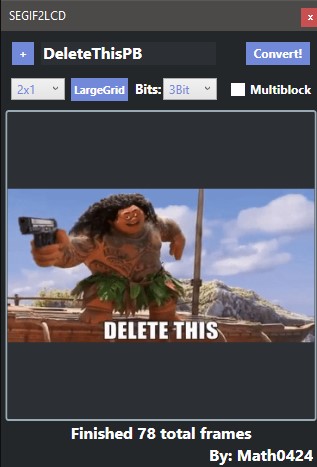
GIF2LCD is a program that allows you to turn any gif into a animated image on a LCD

Download here
Use
This tool was made for the user experience and is simple and easy to use

Step 1: First step is to get a target image.
Press the [+] button and select your gif

Step 2: select the LCD size and grid size
Select the LCD size that you want from the dropdown and then the gridSize by pressing the button

Step 3: Choose the bitrate that you want the image in
The bitrate is the quality of the image, 3Bits is if you are using the MonoSpace font.
If you want a better quality image use 5Bit, but you will need THIS mod to display it on the LCD

Step 4: Select mutliblock mode if applicable
If you have a large gif (1000 frames+) select multiblock mode so you can paste it in easier

Step 4: Press convert and it'll do its thing
After its done converting you can find it in your blueprints selection under the gif name
InGame
Displaying the image ingame is pretty trivial
(If you are using multiblock mode see below)

Regular use:
Start by pasting in (or weld from a projector) the programmable block.
It will come default with basic args, the format is as follows

animate:[fps]:[startingFrame]:[LCDname]

You can change any of these values, once you press run it will try to display the image on the LCD specified. Be sure to change the LCD to text and set its font appropriately

If you want to stop the script you can run "stop" in the args

MultiBlock mode:
If you have multi block mode you will have to paste all parts of the programmable blocks

Each block follows the format [NAME]_[number]
The control block is called [NAME]_MAIN

Once EVERY one of the blocks are pasted you can follow the instructions above but all arguments will be ran in the [NAME]_MAIN programmable block
Examples
5Bit font (left) vs MonoSpace font (3Bit, right)


This is actually the ENTIRE video in gif form, but here is a section of it
25 Yorum
diegogcunha 24 Kas @ 21:04 
It doesn't make sense to have a line of code for the programming block; when you convert it in the program, it generates a blueprint.
maraz 7 Ağu @ 5:28 
If Gif2LCD isn't working for you, there's a browser-based tool that can be used to create animations, either from frames or video files. It has many other features as well.

https://psteamcommunity.yuanyoumao.com/sharedfiles/filedetails/?id=3538001375
nickforgie 26 Tem @ 17:23 
the gif just flickers badly, and when it's not flickering. it's not lining up properly
Khaziir Everflight 16 Eki 2024 @ 9:47 
the converter keeps crashing when selecting the Gif2LCD option and selecting the filepath
Kiler Mansters 3 Eyl 2024 @ 17:36 
this guide needs update
Sakom_Muwin 15 May 2024 @ 18:45 
Hey Math, I tried making a gif lcd panel and the gif on the panel flickers and doesn't display right. I'm using the current version.
Kiler Mansters 9 Şub 2024 @ 14:53 
it doesnt show up anything despite doing everything :(
SilentKnight 19 Oca 2024 @ 22:46 
i dont fully understand how to do multiblock( Brain is dumb)
Praetorian 26 Eki 2023 @ 22:52 
Thank you so much dude. Bless you :steamhappy:
Math  [yaratıcı] 25 Eki 2023 @ 14:23 
Pushed an update to SEImageConverter, download version 1.4 so it works