Space Engineers

Space Engineers

503 个评价
Button Pad - Touch App
11
10
4
2
6
5
2
4
2
3
3
   
奖励
收藏
已收藏
取消收藏
Type: Mod
Mod category: Block, Script, Other
文件大小
发表于
更新日期
452.433 KB
2023 年 2 月 14 日 下午 8:56
2024 年 1 月 21 日 下午 12:16
8 项改动说明 ( 查看 )

订阅以下载
Button Pad - Touch App

在 Adriano 的 1 个合集中
Adriano's Space Engineers Mods
6 件物品
描述


Button Pad
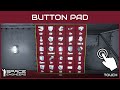
This mod adds an App to LCD screens that works like regular button pads but on LCDs, you can assign some terminal actions to buttons.
The amount of available button depends on the screen size but can be configured using "Ctrl + Shift + Mouse Scroll Wheel".

How to Install
  1. Open any LCD Block Control Panel;
  2. Change Content property to Script;
  3. Select "Button Pad" from the list;

How to Use
  • Click an empty button to add an action;
  • Select the block and the action or click outside to cancel;
  • If the action is a PB Run, add the argument on the text field;
  • Last step is to choose what text will show, this can be changed later with SHIFT;
  • To clear a button hold Ctrl to see the option, then click the button;
  • To change the text, hold SHIFT and click the button to cycle the text options.
  • It works with BLUEPRINTS now!

Screens and Touch
It works and adapts to pretty much any LCD in the vanilla game and DLCs including cockpits. Use Screen Calibration app to make it work on any modded LCD.
Touch screen feature is provided by TouchScreenAPI mod.
Which makes both cursor and UI elements available for any modder.
Send me a direct message on Github[github.com], Steam or Discord (@adrianolima).

Multiplayer and Servers
It works in singleplayer, multiplayer and also servers. Since it is a TSS (LCD script) it runs almost entirely at client side.
The clients are responsible for drawing and checking available actions on the grids, and also sends to the server only for persisting data across sessions.
I made it only visible to players that have access to the block, so share with faction will allow other player to interact with it.

Changing the Scale
Use "Ctrl + Plus" or "Ctrl + Minus" to change the scale of the app. "Ctrl + 0" to reset.
This can be very useful for small screens.

Running at 6fps
This is a limitation on the game side for LCD screens texture frames update.
There is a possible workaround to make it run at 30fps, but for performance reasons I decided to keep this first version without it.
It is possible that I change it on upcoming versions.

Have and idea of a Touch App?
I created an open Discussion on TouchScreenAPI for people to share and discuss ideas.
138 条留言
Rastlore30 12 月 10 日 上午 11:35 
So far in my testing is does in fact work, initially. It will not persist if you save the blueprint and then print it.. all configs are lost. Clearing the LCD and then loading up the ButtonPad will not clear this error. I have had to grind down the screen and build a new one to use this mod on it again. In addition it will cause the BuildInfo radial menu to show up when you try to scale the number of buttons on the LCD. So as long as you never have to rebuild the screen due to destruction or via blueprint it will work.... sad really, I have like 12 blueprints with this loaded on them from 2 years ago... this makes me not want to update them.
PimpMyDog 11 月 26 日 下午 4:43 
Is this mod worked on anymore? I stopped using it since all the hard work of configuring a screen, it is often lost in blueprints.
aantono 11 月 2 日 上午 7:49 
How does one configure actions that require text/value input (for example for piston and rotor - "set and move" actions.)?

It would be great if that was possible and documented somewhere!
FELON | MrBlackie 10 月 15 日 上午 2:03 
you should mention ctrl shift scroll to change button scale
flo95jlm 8 月 9 日 下午 4:25 
This mod is greats and works perfectly fine BUT it have a big problem of persistance : the settings I make on buttons whith blue prints dosen(t save at all It dissapear when I am to far or when the server 'refresh" I think (I tried everything about that please help us and updtade please! )
PimpMyDog 4 月 27 日 下午 6:10 
Would it be possible to save an LCDs setup to Custom Data on the LCD? Even if it's not human readable and editable it would help a ton because it seems to work intermittently with blueprints. Sometimes the buttons persist, sometimes they turn into question marks. Having the data be optionally in the Custom Data would maybe help with the persistation.
smokified 1 月 24 日 下午 5:59 
Also, the information above says "works with blueprints". Is there a guide somewhere on how this works?
smokified 1 月 24 日 下午 5:48 
I have build Vision installed and it seems to conflict with the keys to change the size, font and clear buttons.

Is there a workaround for this?
kos_dragon 1 月 7 日 上午 8:42 
Hi! It would be nice to be able to fix Action Relay "set channel and send signal" (signal not set), and also for piston and rotor - "set and move" actions.
Caffinated_Blacksmith 2024 年 12 月 9 日 上午 3:58 
could you make the LCDs inside the teleporter into an actual LCD? its rather annoying that it isnt because it means I cant use the ButtonPad App mod to have the teleport button be a single action inside the teleporter itself