ARK: Survival Evolved

ARK: Survival Evolved

740 vurderinger
Dynamic Fence System
2
   
Pris
Føj til foretrukne
Gjort til foretrukken
Fjern som foretrukken
Content Types: Structures
Filstørrelse:
Offentliggjort:
Opdateret:
12.690 MB
23. maj 2017 kl. 8:43
7. aug. 2017 kl. 3:09
24 ændringsbemærkninger ( vis )

Abonner for at downloade
Dynamic Fence System

I 1 samling af wuzzy
WuzzyMyServer
20 genstande
Beskrivelse
Dynamic Fencing System

release: 07/08/17: fixed Possible server/client position mismatch.

A Dynamic electrified fencing system capable of adjusting both for section length and terrain height variations.

Mod id: 931434275

NOTE: When you connect fences to a gate, the second placed post will likely connect to the first across the gate as it is more than likely to be the closest post. You just need to "cycle" it, from the radial menu, to break that connection! Remember its the second placed post that makes the connection, thats the one you need to disconnect. Hope this clears up any confusion. I'm considering making posts connect to gates directly but that is for the future!

NOTE: some people have mentioned issues with frame rate when the lights on the posts are in use. I believe it may be down to the shadows they cast. If this affects your setup the simplest thing to do is to remove the lights from some or all of the posts

Place the posts in the normal way. A connection will automatically be made if there is another post withing 10m. Connection will be to the closest post available. A radial menu item will allow you to cycle the connection to other posts within 10m or to disconnect the post all together. If there is no post within 10m no connection will be made and the menu item will not appear. An optional lamp component can be toggled on an off providing a pool of light around the post when the fence is electrified.

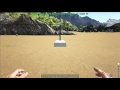
When placing the colour of the preview post will change. It will be green if the placement is good and there is a post within 10m, green+blueish if placement is good and no post is in range, red if placement is bad and there is a post in range, red and blueish if placement is bad and no post is in range. Place first post as blue and subsequent posts as green and it should all connect up! Hopefully this makes building easier and more efficient. see video

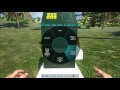
To electrify the fence place a controller near a power outlet. Either use the option to control nearby posts on the controller or use the attach to controller option on a post (directly connected posts should attach as well!) The controller can then be used to turn on and off the electrification of the fence sections. An indicator on the post will glow red if it is electrified and active. Shock damage will be done to anything coming in contact with the fence, from either side, while it is active. Different sections of fence can be attached to different controllers.

Gates are electrified in the same way as fence sections..

Note: Electric fences don't work in water! you won't be able to activate them

Fences operate in one of two modes, lethal (red lamps) and stun (blue lamps), the mode is set using the controller radial menu. In lethal mode the fence delivers the requested damage untill the target is dead. In stun mode, the fence acts like an in-game electric prod. It will deliver little damage but much more torpor (1 damage == 266 torpor). In stun mode the fences motion detectors allow it to stop damaging the target when it is knocked unconscious and stops moving. One use for this mode is in a taming pen where it can gently stun the creature you want to tame. You can disable the stun mode and change the damage delivered via the ini file.

Gates will snap at either side to posts to make a continuous fence. Gates can slide to either side (toggle on the radial menu). You can also set them to manual, automatic or automatic close modes with an adjustable close delay. A control box either side of the gate provides a convenient interaction point.Two versions of the gate are available, a single width and a double width version. The double width does not support direction changes obviously.

Gates now have an auto-level feature. When placed, if either end is below ground, the structure is raised and a gravel foundation placed beneath it. The foundation can accept ramps/ceilings snapping to it to further extend the sloped area. This feature is currently in testing and can be disabled in the ini file if you dont want it! However without it the double gate is hard to place on anything other than flat ground.

Allies and their animals should be treated as team so the ini 'no team damage' should also prevent ally damage. The gates can now, through the radial menu, be switched to allow allies to open and close them (either manual or automatic operation should work).

The posts, gates and controllers can be picked up or demolished, pickup will place the item back in the player inventory.

Crafting is currently in player inventory to avoid the need for yet another bench.

Gates, Posts and controllers are metal level damage, Posts and gates are destroy by explosive only. A post/section has roughly half the health of a metal wall.

All components require metal ingots to fabricate, posts and gates also require stone and obsidian, the controller requires electronics.

Information links
Spawn codes - see discussion
Configuration ini settings - see discussion

My mods:

Review
Populære diskussioner Vis alle (6)
12
21. juli 2017 kl. 10:03
fence height feedback & suggestions
RagingSaint
10
11. juli 2021 kl. 11:42
FASTGJORT: Game.ini Crafting Override Example
[GAS] Hu5ky
3
7. feb. 2023 kl. 3:46
Loving it so far, and its by far the best way to do fences in this game. One problem
Tabletopcheese
508 kommentarer
barracuda922 22. aug. kl. 16:15 
can you change the lamp brightness?
BIgdudedonteat 21. juli kl. 18:16 
great mod thanks for making it it keeps unwanted dinos out but till powerful for modded dinos
Zorafreund 19. feb. kl. 7:40 
helllo,
When comes this Fence Mod to Ark Survival Ascended ?
kingofblades1988 13. jan. 2024 kl. 17:10 
we host our own server that is non-nitrado it is completely possible. I understand not wanting to mod for a game your not playing. If you do decide to your fence mod would be incredibly welcome.
Khaogar 30. nov. 2023 kl. 13:45 
If you don't want to make it available for Ascended at least make it open source, no? People are craving the mod... That'd be great for the whole community.
wuzzy  [ophavsmand] 24. nov. 2023 kl. 1:22 
@Small I don't intend to go down that route.
Small 23. nov. 2023 kl. 17:38 
wuzzy is it possible to make the code open source?
wuzzy  [ophavsmand] 6. nov. 2023 kl. 0:39 
I wasn't trying to brush you off, I was serious, go pull the dev kit and read the wikis, it really isn't that hard! There is a load of info out there, and mods are all made to a pattern.
Khaogar 5. nov. 2023 kl. 16:05 
Sadly I know nothing of modding. I wish I did tho lol. Maybe one day! Sorry if I seemed rude. It's just that this mod was always a MUST for the past years for us and it's making us really sad hehe. Hopefully you'll eventually get back in!
wuzzy  [ophavsmand] 5. nov. 2023 kl. 1:14 
The Dev kit is free to download, give it a go it's simple enough.