STAR WARS™ Empire at War: Gold Pack

STAR WARS™ Empire at War: Gold Pack

58 个评价
Switching units between mods (Modding Tutorial)
由 SevenFiftySix 制作
Do you have a favorite mod but want to add another unit from somewhere else? This guide will give a general idea of how to do so by walking you through the process of adding an infantry unit from Battlefront Commander into z3r0x 3.5.
2
   
奖励
收藏
已收藏
取消收藏
Disclaimer
This guide is meant to give a general idea of unit modding and will not apply to every situation. Most mods use their own file and code layouts, and some will be MUCH MORE COMPLICATED than others. To keep it simple here, we are using code from two mods that keep individual unit data in their own .xml files.

This is mostly meant for personal or private mods. This shouldn't have to be said, but DO NOT just add a unit or two to someone elses mod and upload it as your own. People work hard on this stuff and we are only copy/pasting bits of their art and code. I take no credit for any of the work done in these mods. If anyone from the Battlefront Commander or z3r0x mods don't want me to use their work for whatever reason, let me know and things can be changed.

Feel free to ask questions or point out errors.
Required Tools
FIRST you'll need these two tools from the petrolution mod site. You cannot use custom icons or text strings without them.
-MtdEditor to add the unit icons
http://modtools.petrolution.net/tools/MtdEditor
- .DAT editor for the game's unit text strings
http://www.petrolution.net/item-172?addview

This guide assumes you're adding the unit to another mod which has all the required files. If you need to extract something else from the base game's files, you will also need the .MEG extractor tool found here.
http://www.petrolution.net/item-223?addview

For editing the game's .xml code files, any basic text editor will work. It may open with internet explorer by default, but I would suggest using notepad or wordpad.

And if you're wanting to replicate this guide exactly, here are the mods used.
z3r0x 3.5
http://www.moddb.com/games/star-wars-empire-at-war-forces-of-corruption/downloads/z3r0x-foc-addon-mod-35
Star Wars Battlefront Commander
http://www.moddb.com/mods/star-wars-battlefront-commander
Finding the Rebel Light Elite Soldier model and textures
The unit we are moving over is the "Rebel Light Elite Squad" from Battlefront Commander. We will find the unit's code file first to get the model name. Sometimes the model and unit will have different names so it's good to double check.

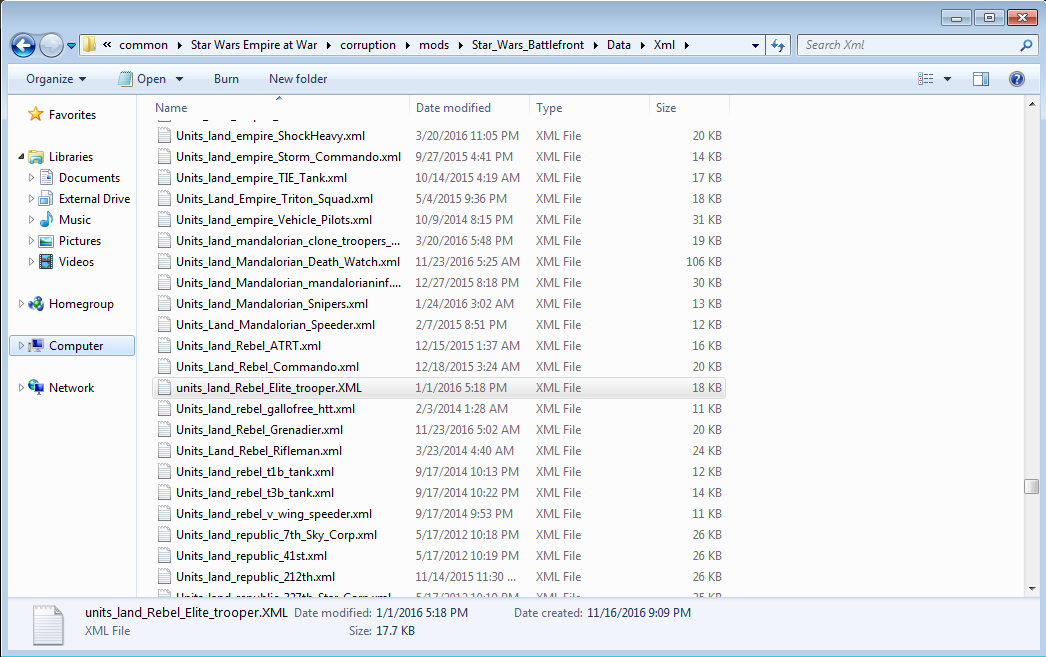
-Hop to Battlefront Commander's data\Xml\ folder and find units_land_Rebel_Elite_trooper.XML.


-Open it up with any standard text editor like notepad.
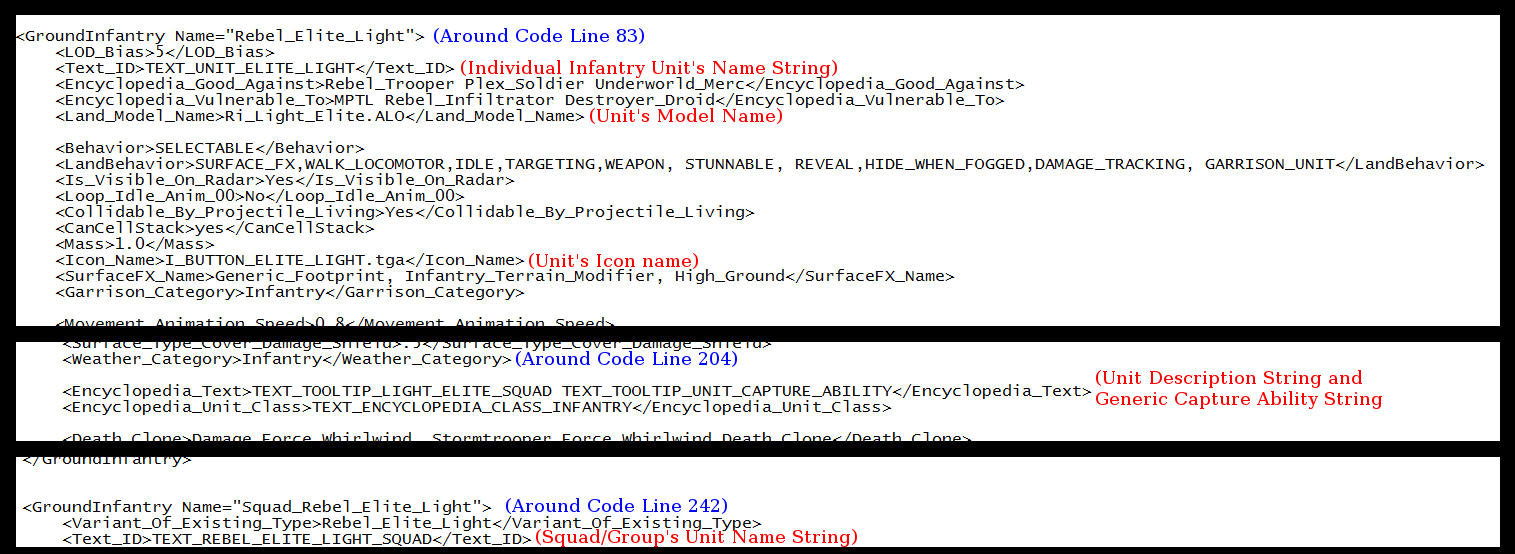
-Find the unit's Model_Name, in this case it's Ri_Light_Elite.ALO.


-Go to Battlefront Commander's data\art\Models folder and ctrl+f search for Ri_Light_Elite, since it's an infantry unit there will be 28 results which cover the unit models (.alo files) and unit animations (.ala files) along with any variants. Copy/Paste the files into your z3r0x \data\art\Models folder.
---Note some units like vehicles will only have 2 or 3 files and some ships can have half a dozen or more. Just nab any files with the name of your unit to be safe.
-Now go to Battlefront Commander's data\art\textures and ctrl+f Ri_Light_Elite again. If nothing shows up, try searching for similar variants. In this case, it will bring up 2 .dds files: Ri_elite_norm.dds and Ri_elite_diffuse.dds, copy/paste them both into z3r0x's data\art\textures folder.
-Since these troopers use a version of the Republic DC15 rifle not already in z3r0x, we will need those textures too. Get Battlefront Commander's rep_dc15c.dds, rep_dc15c_n.dds, Rep_Dc15Rifle.dds, and Rep_Dc15Rifle_n.dds textures and throw them in z3r0x's texture folders.

Now that all the proper mesh and texture files have been moved over to z3r0x's mod, we will get the unit icon.
Unit icons and the MTDEditor
-Open Battlefront Commander's data\Xml\ folder and find units_land_Rebel_Elite_trooper.XML again.
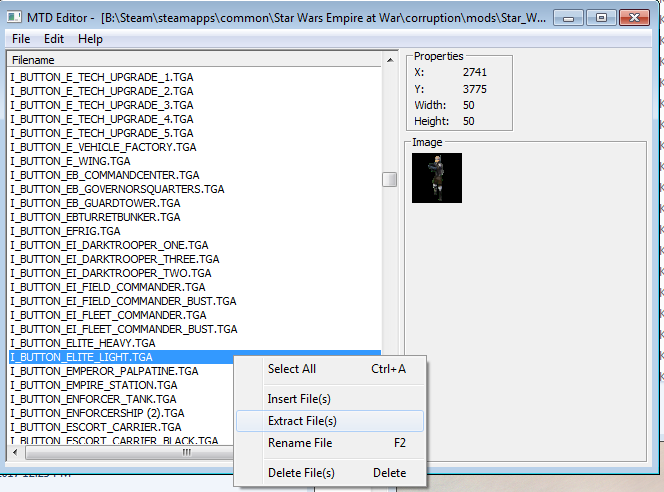
-Ctrl+f search <Icon_Name> for the unit's icon name, in this case it's I_BUTTON_ELITE_LIGHT.TGA
-Now that we know that, boot up MTDEditor.exe
-Click file > open > navigate to Battlefront Commander's data\art\textures folder. There should only be one Mt_commandbar.mtd, open it.
-Another box pops up, scroll down and select Mt_commandbar.tga
-Once it's loaded, scroll all the way down to I_BUTTON_ELITE_LIGHT.TGA, right click on it and extract the file to somewhere like your desktop.
-Click file > open > navigate to z3rox's data\art\textures folder. There should only be one Mt_commandbar.mtd again, open that and z3rox's Mt_commandbar.tga
-Click Edit > Insert file and navigate to your desktop or wherever you extracted the icon
-Select the I_BUTTON_ELITE_LIGHT.TGA you extracted earlier and click open
-Click File > save

Now that z3r0x's MTD file has the icon, we're gonna get the text strings.
Text Strings and the .DAT Editor
-Open Battlefront Commander's data\Xml\ folder and find units_land_Rebel_Elite_trooper.XML AGAIN.
-We need the <Text_ID> string names for the individual soldier (TEXT_UNIT_ELITE_LIGHT)
-And the unit's <Encyclopedia_Text> which in this case is (TEXT_TOOLTIP_LIGHT_ELITE_SQUAD)
-And we need the <Text_ID> string names for the company/squad (TEXT_REBEL_ELITE_LIGHT_SQUAD)
-Boot up the DAT editor
-Click File > Open
-Navigate to Battlefront Commander's \data\Text folder and open up MasterTextFile_ENGLISH.DAT
-Boot up the DAT editor again so you have 2 instances running
-Click File > Open again and navigate to z3r0x's \data\Text folder and open up MasterTextFile_ENGLISH.DAT
---Be sure you remember which window is which mod.
---I'll be calling Battlefront Commander's "Window 1" and z3r0x's "Window 2"
-We have to manually scroll to each entry. There's no search function.
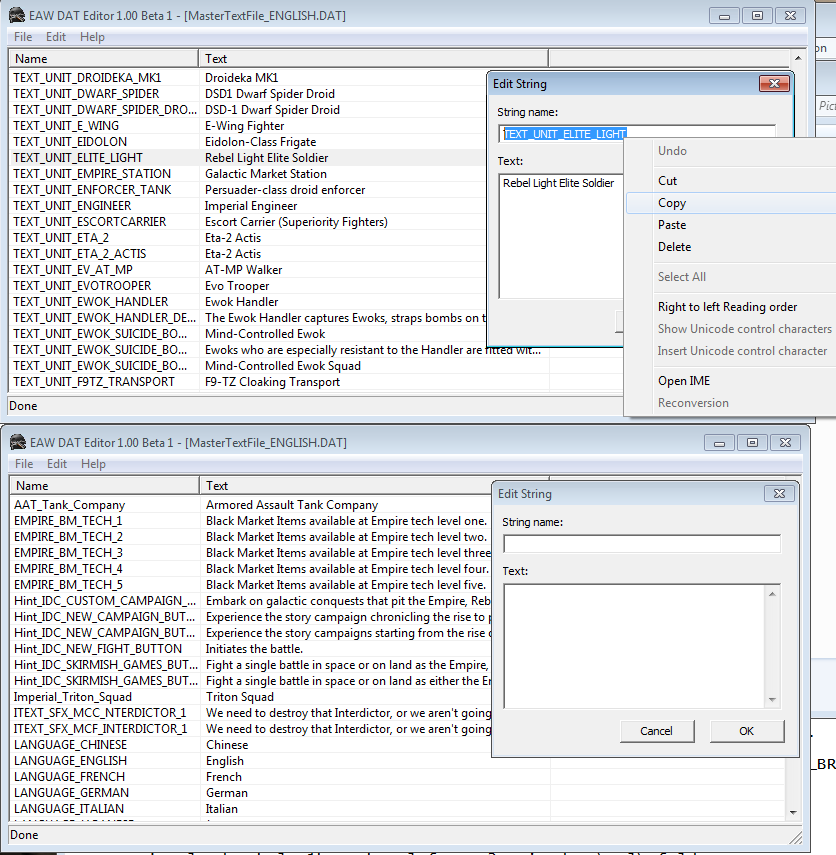
-Find TEXT_UNIT_ELITE_LIGHT in Window 1
-Double click its line to see the edit string box.
---In window 2 go to Edit > Insert String, the edit string box will pop up.
---Copy/paste the info from Window 1 to Window 2 and click OK.
-----Repeat the past 4 steps for TEXT_TOOLTIP_LIGHT_ELITE_SQUAD and TEXT_REBEL_ELITE_LIGHT_SQUAD
-Close Window 1 (Battlefront Commander's)
-Click File > save on Window 2 (z3r0x's)

Now we have the model, texture, icon, and text. Time to finish addding the unit code.
.XML files
-Copy units_land_Rebel_Elite_trooper.XML from Battlefront Commander's data\Xml\ folder.
-Paste it into z3rox's data\Xml\ folder.
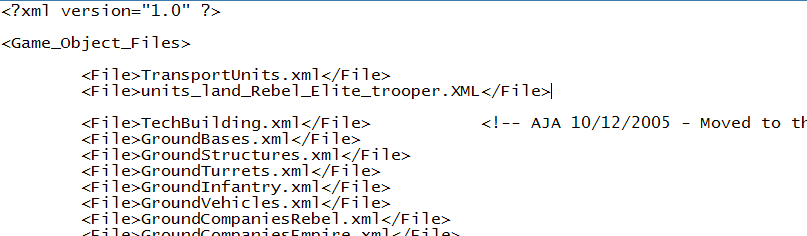
-Open Gameobjectfiles.xml in z3rox's data\Xml\ folder.
-Add an entry for units_land_Rebel_Elite_trooper.XML somewhere BELOW the first <Game_Object_Files> line but above the last </Game_Object_Files> line.
---Should look like <File>units_land_Rebel_Elite_trooper.XML</File>
-Save and close Gameobjectfiles.xml
That lets the game/mod read units_land_Rebel_Elite_trooper.XML Now to add the unit to skirmish.

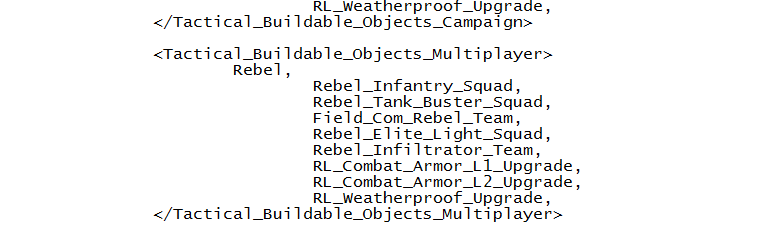
-Open up Specialstructures.xml in z3rox's data\Xml\ folder.
-Scroll down to <SpecialStructure Name="R_Ground_Barracks">
-Scroll further to the <Tactical_Buildable_Objects_Multiplayer> line.
-Add the unit's company name from units_land_Rebel_Elite_trooper.XML to the multiplayer buildables list below the line that says "Rebel," and be sure your new line ends with a comma
---In this case it's Rebel_Elite_Light_Squad
---The proper entry for recruitment is generally going to be a company. When in doubt, look for unit segments that include MULTIPLAYER SKIRMISH VALUES data.
-Save and exit.

Since the troops use non-default projectiles, we have to copy over that info or else the game will crash.
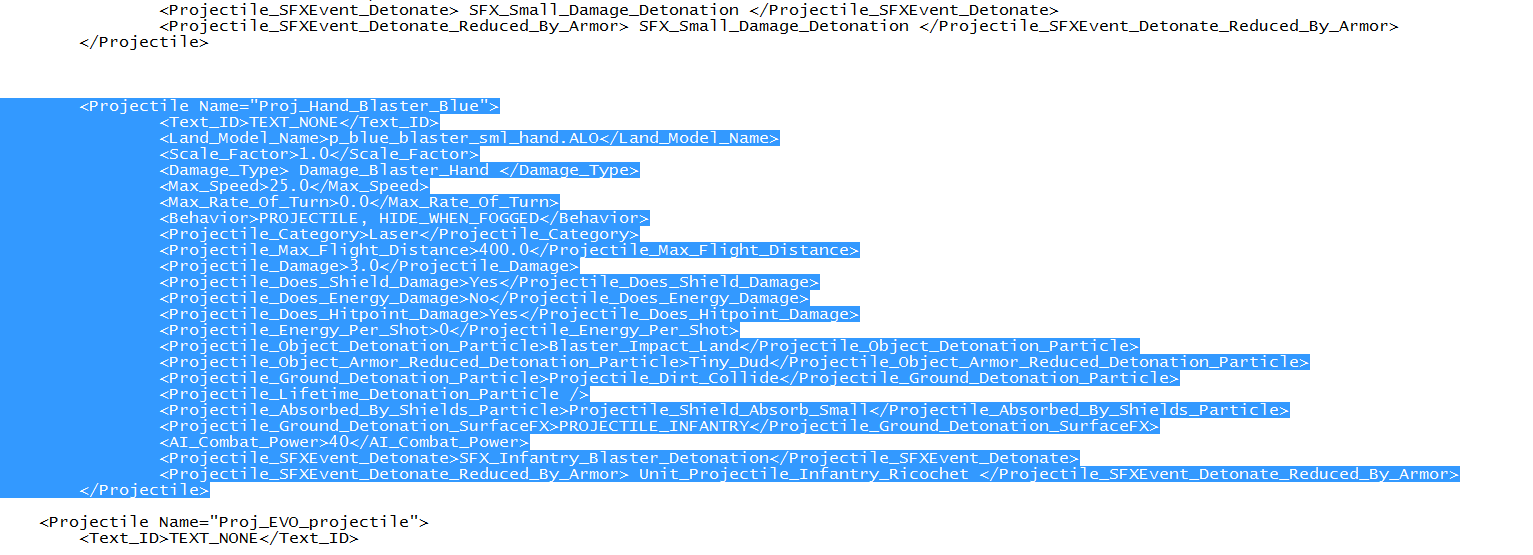
-Open up Battlefront Commander's PROJECTILES_2.XML
-Ctrl+F search for Proj_Hand_Blaster_Blue
-Select and copy the entire entry for that projectile
-Paste the block into z3r0x's Projectiles.xml somewhere below the 3rd line of code (past the <?xml version="1.0"?> and <Projectiles> lines)
-Save and exit.
Wrapping up and troubleshooting
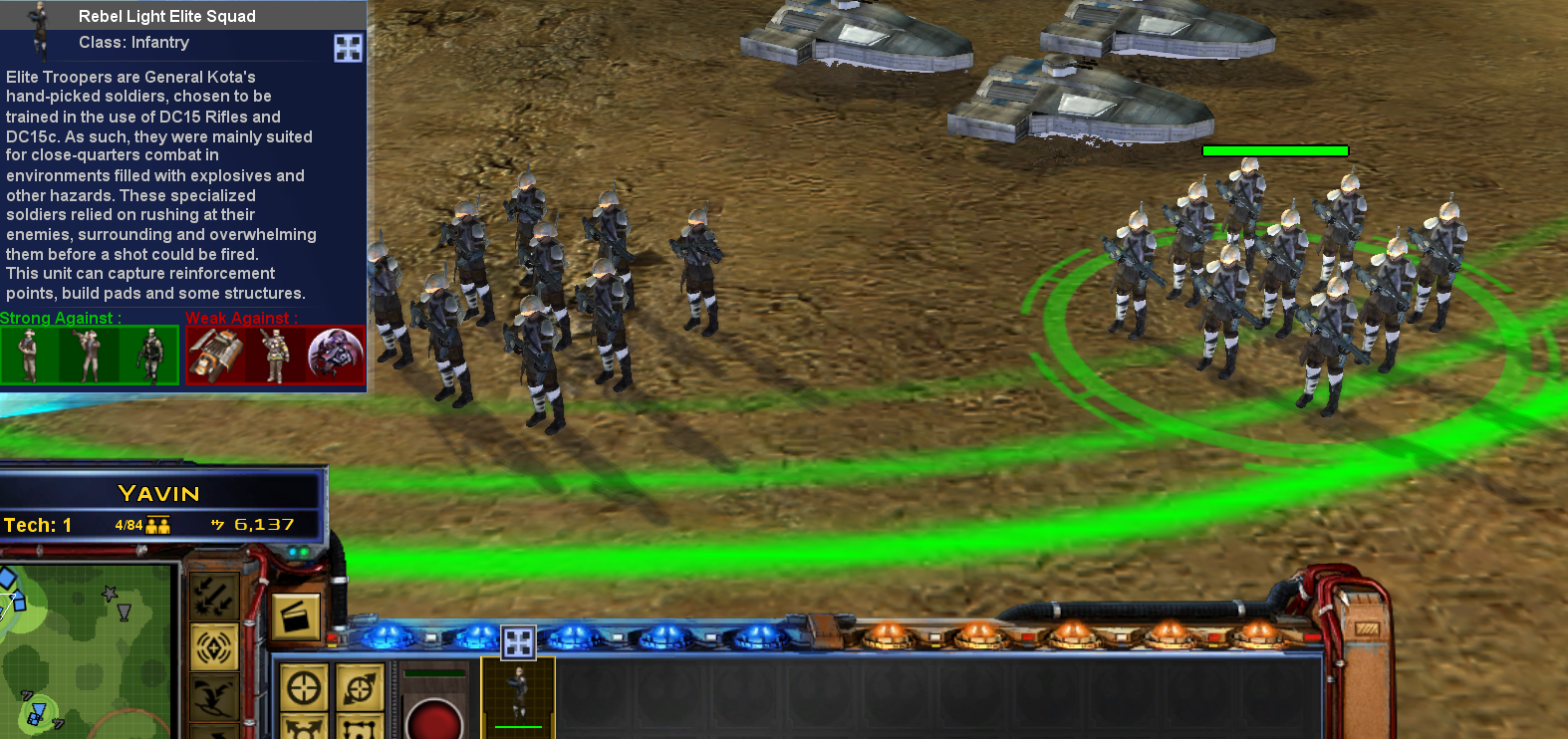
Now you should be able to boot up z3r0x's mod and recruit the Light Elite squads from the Rebel Barracks.
The unit stats and settings can be tweaked in units_land_Rebel_Elite_trooper.XML. At some point I may do a short guide about unit stat editing, but it's pretty straightforward. For example:
<Damage> = damage
<Tactical_Build_Cost_Multiplayer> = skirmish price
<Death_Persistence_Duration> = how long corpses stay
Just play around with the settings and do what you like.

Common Issues:
Units T-Pose
- Your infantry are either missing custom animation files (.ala) or reading the wrong ones. Make sure you carried over all the .alo and .ala files that unit uses.

White Textures / petroglyph logos on units
-The unit's proper texture is missing, make sure ALL the proper files are in the textures folders.

Text says [MISSING]
-It's not reading the text string in the .dat file, make sure the string name in the .dat file matches the string name in the .xml files.

Game crashes when mouse hovers over unit
-It could be a number of issues, generally it's either a missing projectile, missing sound file, or GUI issue. It's harder to troubleshoot and you kind of just have to retrace your steps to see if anything doesn't match up.

Random crashes or crashing on startup.
-Code problems. Again, hard to track down and there are dozens of possible issues. Recheck your code and look for any errors.

If there are any questions, drop a comment and I may be able to help. If it has something to do with multiplayer or Republic at War though, too many other things are involved and I probably can't help much.
149 条留言
SevenFiftySix  [作者] 12 月 8 日 上午 11:51 
@starfleet74205 republic at war has weird file layouts and I do not recall specifics off the top of my head, however it is likely they have a custom file called something related to HARDPOINTS.XML that has new custom hardpoints that exist in the old mod but not the new. The hangar is likely a generic hangar hardpoint which is why it and presumably the engines / shield generators work too.

If you haven't already found it by the time of my late reply then yeah, you'll have to dig for wherever the ship hardpoints codes are hidden and throw that into the other mod. HOPEFULLY they use names that are rather self explanatory but some modders are uhhhh better about doing that than others.
Starfleet74205 12 月 3 日 下午 6:58 
So, I did this while I got a ship in the Republic at War mod to work. I can build it it will move and the fighters will launch. However, though the guns wont shoot. Everything seems to be working but the gun hardpoints. They're not firing. What did do wrong?
Darth Anarchy 3 月 10 日 下午 2:51 
ok ive gotten somewhere, instead of the 28 files though i have one
Darth Anarchy 3 月 10 日 下午 1:39 
it is classed as a normal unit not a hero unfortunately
Darth Anarchy 3 月 10 日 上午 6:54 
thanks i'll give that a try
SevenFiftySix  [作者] 3 月 9 日 下午 12:53 
I've not played that mod so I dunno the unit, is it "normal" or is it classified more like a hero?

If it's the latter, the required files may be under other names and have entries in hero list xml files. I don't currently have the game installed but can attempt to broadly troubleshoot what the issue is.
Darth Anarchy 3 月 9 日 上午 10:57 
hey im trying to take the sith acolyte from the star wars legacy 2.1 mod and put it in to the z3r0x 3.5 mod and im really struggling, im very new to this can i get some help please ? guide is really helpful but im not great at this lol
SevenFiftySix  [作者] 2 月 15 日 上午 8:12 
Entirely up to you. I haven't looked in ages but I THINK most of the added code is just bribery / underworld related anyway, so the sections may be easy to spot.... I think.

And of course making sure stuff like faction names and build requirements, etc all exist in both mods or are adjusted as needed.
Wolfstorm Warrior 2 月 15 日 上午 8:00 
@SevenFitfySix well said ship is also in fall of the republic i could take it from there since its a FOC mod
SevenFiftySix  [作者] 2 月 15 日 上午 3:51 
@[VI] Hunter Darkwolf - I don't quite recall off the top of my head but I *think* there may be a couple extra lines of code in FOC units, so if you get a mountain of crashes then you may want to compare the base game mod's unit to a similar unit within the FOC mod. As long as you copy / paste the missing lines in the right spot, it should work fine.