Undertale

Undertale

29 个评价
Idiot's Guide to Undertale: Chapter 0: The Basics
由 bhwgamer 制作
Are you new? This guide will tell you the main basics of Undertale. It is mostly intended for the people who said they would play it once the hype died down a little.
   
奖励
收藏
已收藏
取消收藏
Howdy!
Welcome to Chapter 0 of the Idiot's Guide to Undertale! I called this guide chapter 0 since it is more of a pre-guide/info guide rather than a walkthrough. In this guide, I cover the very basics of the Undertale game so that you know what you're doing. This is a great place for beginners to start on their Undertale journey. It's as spoiler-free as can be, too. Let's get it started, shall we?
"Why did you make this guide? Undertale is ded xd"
I made this guide for a good number of reasons.

1. There is a lack of complete, in depth, newbie-friendly guides to this game.
2. A year ago, I noticed several people saying "Oh, I'll play Undertale when the hype has died down." This guide is for all of those people and for the people who live under rocks that have just found it.
3. I sorta felt like it. I'm bored and have never made a guide before. So why not?

Also keep in mind that I will be uploading multiple guides in the form of chapters in order to make it more readable and easier to avoid spoilers. (I'll keep it as spolier-free as I can anyway.)

Anyways, welcome to the Idiot's Guide to Undertale!
What is Undertale about?


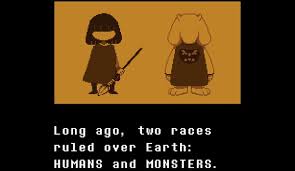
There is only so much that can be said about what this game is about without spoliers. A long time ago, monsters and humans ruled over Earth, but ended up in a war in which the monsters lost. The humans sealed them underground with a magical spell that lets living things in, but not out. Everyone that has climbed the mountain has never returned. You play as a small child who climbed Mt. Ebott with no clear reason. In order to take cover from a rainstorm, the child goes into a cave. The child notices a hole and gets closer to investigate, but falls down it into a monster kingdom called The Underground. From that point on, you must survive in a cave full of strange monsters with a tragic history. The rest of the story, I will leave to you to discover.
[New Section] The Intro Sequence/Start Menu
[Update to guide]

Ok. So you might be wondering why on Earth this section even exists. Well, in lieu of an incident on the forums that happened recently, I felt that this needed to be added to help prevent another embarrassing train wreck like that from ever happening again.

So when you boot up the game, a little intro sequence plays involving a war between monsters and humans and some kid falling down a mountain, right? Well, when it's over, press Z or Enter to get to get to the instructions menu (or start menu if you have started a save game already). When you have read the instructions, press Z or Enter again to get to the screen to name the fallen human.

I know this is very redundant but someone managed to not see the huge, uppercase, bolded message after the intro sequence that says: PRESS Z OR ENTER TO START

Remember kids, stay in school; it's cool. (or at least learn to read it's not that hard)
The Controls
I feel like this is a very redundant section, but some people do skip the instructions screen before playing (somehow). (Keep in mind that if you are using a controller, you have to configure it on your own on the configuration screen that automatically pops up when you plug it in.)

Forward = Up arrow key on your keyboard
Down = Down arrow key on your keyboard
Left = Left arrow key on your keyboard
Right = Right arrow key on your keyboard
Use/Interact = Z or Enter keys on your keyboard
Menu = C key on your keyboard
Back = X key on your keyboard

All the controls also apply to the batlle screen. The movement controls move your SOUL around the screen to dodge attacks and the interacting keys let you choose what to do when it's your turn.
The "C" Menu
It isn't that hard to figure out what each option does in the C Menu, but I'll tell you anyway. When you open up this menu, you will see the following options:

ITEM: This option will show you all the items you have in your inventory.
-------USE: This will consume/use the selected item. Food heals you, and armour/weapons get equipped.
-------INFO: This will tell you about what the selected item does. Most of the time, it includes a quirky description.
-------DROP: This drops the selected item on the floor. Keep in mind that you will not be able to get it back once you drop it since the action is more like throwing it away.

STAT: This screen tells you the name you selected at the beginning of the game, your current LV, your current HP, your current AT, your current DF, your current EXP, how much more EXP until the next LV, your equipped weapon, your equipped armour, and the amount of gold you have.

CELL: This brings up a menu where you can select a monster to call, if you have gotten their phone number. They will talk to you and give you advice based on your current location. The first monster you get a number from has a unique menu where you can choose a number of topics to talk about.

Under all these options is a box that gives you a quick rundown of your status. It tells you the name you chose at the start of the game, your LV, your HP, and your G (gold).
Battle HUD


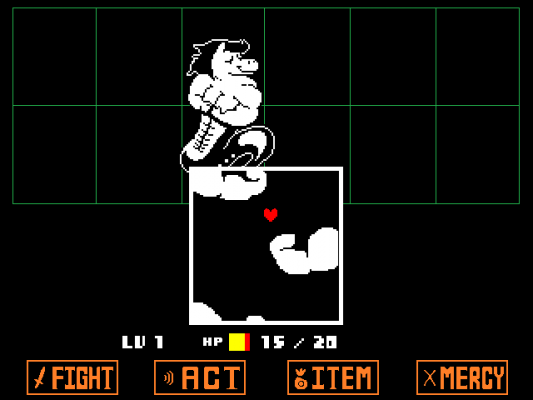
There are several things for you to do when you get into a battle. When all monsters are out of the battle, you win the fight. You can get rid of a monster by killing them or leaving them be. When it's their turn to fight, you must dodge their attacks with your SOUL in a bullet-hell format.

FIGHT: When you select this option, you have to choose the monster you want to damage. When that has been done, a bar/muliple bars (depends on equipped weapon) will move across a display. When you want to attack, press the interact button when the bar(s) land where you want. The closer to the middle of the display you strike, the more damage you do to the monster. When you get its HP to 0, it dies. When all monsters are off the battlefield (if killed), the battle ends and you gain EXP.

ACT: When you select this option, you have to choose the monster you want to act on. From there, you have to choose what you want to do to the monster. Every monster has the option to CHECK, which shows you how much HP and DF they have as well as important information about them. Each type of monster has a different set of actions aside from check that you can use on them. ACTing on a monster can have differing effects on them depending on what you do. It can lower/raise their DF, lower/raise their attack, and/or help towards making them SPAREable.

ITEM: When you select this option, it shows you all the items in your inventory. it works the same way as using them from the "C" menu outside of battle: food heals you and applies any buffs included with it (if any), armour can be equipped, weapons can be equipped, and some items have an effect on the monster you are battling.

MERCY: When you select this option, you have the ability to SPARE or FLEE. The SPARE option lets you choose a monster that you refuse to fight for that turn. If the monster's name is yellow (or pink, if you changed it using an easter egg that I'll talk about in another guide), then the monster will leave the battlefield. If all monsters have left, the battle ends. The FLEE option gives you a random chance to run away. Some battles can't be run from, however. *Sometimes, you have to be persistent with sparing or fleeing when it comes to certain bosses, regardless of name colour.
End of Chapter
Understand now? Good! Now that you understand the basics, I think it's time for us to explore the first part of the game: The RUINS. I will go in-depth on this section of the game in Chapter 1 of the Idiot's Guide to Undertale. If you ever feel stuck at the RUINS or want an in-depth exploration of it, go on to Chapter 1: http://psteamcommunity.yuanyoumao.com/sharedfiles/filedetails/?id=901100978 Goodbye for now!
4 条留言
555bittersweet 2 月 11 日 下午 7:21 
how do i choose :c
Ziggy 2020 年 7 月 19 日 下午 2:30 
i meant sprint
Ziggy 2020 年 7 月 19 日 下午 2:30 
good it isnt like one of the other guides that shows us that you can do something thats not true the thing: SHIFT TO SPRINGT
Owa 2020 年 1 月 3 日 上午 11:12 
flower teh idot