Left 4 Dead 2

Left 4 Dead 2

66 个评价
Add-Ons (VPK-Files) - Upload to the Workshop
由 Floh 制作
How to Upload own mods to the Steam Workshop.
   
奖励
收藏
已收藏
取消收藏
Workshop Manager
Hope you had install the Left 4 Dead 2 Authoring Tools (found in Steam --> Library menu --> Tools menu item).

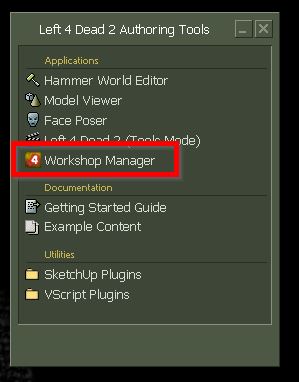
Start up the Left 4 Dead 2 Authoring Tools. You will see on your basic screen something like this


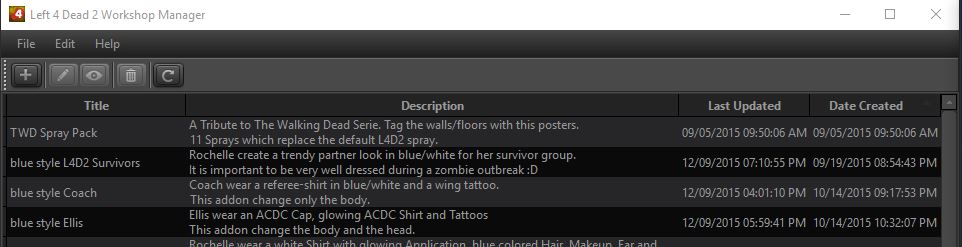
Double-Klick on the "Workshop Manager" and following window open:


You'll see a list of all mods you have uploaded to the Steam Workshop.
Command List

Add/Publish a new add-on


Edit the selected add-on


View this add-on on the Steam Workshop Website


Delete the selected add-on


Refresh view of published add-ons


Add/Publish a new add-on

Klick at the button "Add/Publish a new add-on"


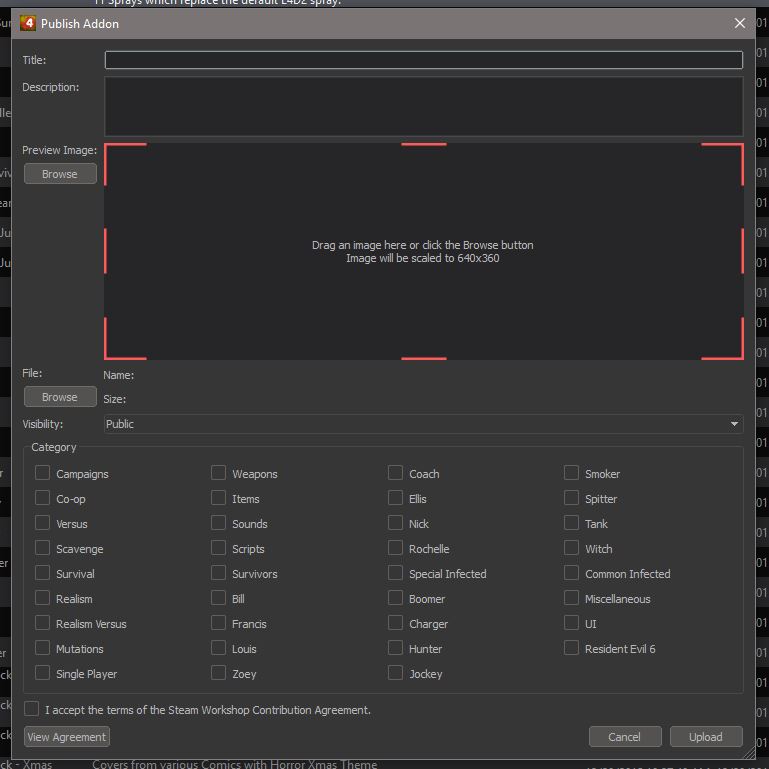
Following window open:


At this point you describe your mod:

1. Title
meaningful short description

2. Description
a description of important changings of your mod
Don't forget credits, if you use the mod from another modder as basic.

3. Preview Image
upload a picture for the mod (scaled to 640 x 360)

4. File
upload your mod (VPK-File)

5. Visibility
change the visibility to private
you will not be able to add any additional screenshots or videos of the mod onto the mod's
page until after it has been fully uploaded. So public your mod only after all is ready.

6. Category
pick tags which will help users find your mod

7. accept the Agreement

8. Upload
klick "Upload" on the bottom right corner of the window


The mod will be upload to the workshop. It may take a couple of minutes depending on how large the mod is. Once the uploading is complete, an internet page (using your default browser) will pop up showing the mod on the workshop.

At this point go to your own workshop at steam, add your screenshots or videos and publish your mod.

12 条留言
DUMFAYCE !! 8 月 6 日 上午 10:46 
when i click anywhere on the authoring tools it does nothing i ♥♥♥♥♥♥♥ hate VALVe
MarekH911 2024 年 10 月 4 日 上午 8:02 
this guide really helps me, thanks (even tho i see so many misspelled messaged its still helpful and good):steamthumbsup:
M1LF HUNTER 2024 年 1 月 1 日 下午 11:39 
error code 8, some idea how to fix it?!
PyroFireGamer 2023 年 12 月 21 日 下午 10:23 
Ok… but how do I update it?
The tab is too big I can’t select update…
lildannyz 2023 年 11 月 11 日 下午 12:19 
Thank you for the guide. It helped me a lot!
realch 2023 年 1 月 31 日 上午 10:44 
this guide is 5 years old
Mafiyozi 2022 年 10 月 23 日 上午 4:51 
how to right publish survival map? Is don't visible in game after downloading addon
yoyuncu 2022 年 8 月 6 日 下午 2:41 
the publish addon size is too big that i cant even press upload.help
Lottie Matthews 2017 年 10 月 15 日 下午 5:23 
Klick
Foxy #L4dnation 2017 年 10 月 13 日 上午 10:43 
hard