Men of War: Assault Squad 2

Men of War: Assault Squad 2

35 个评价
Gem 2.x basic script edit - changing vehicle in mission
由 DJSatane 制作
This guides is for new users of GEM 2.x editor. Topic: Changing vehicle in skrimish/mission in game.
   
奖励
收藏
已收藏
取消收藏
Important
*This guides assumes you know how to work on script(.mi files) within game. Best way is to extract missions from game you want to alter into your own mod folder*
Step by Step:
1. In editor go to F3 mode and load "map\single\01_usa-skirmish\00b_usa-hurtgen\0.mi" (note again, I assume you already have extracted this file in appropiate place, for the purposes of this guide you should have your own mod with files that contain all Hurtgen files extracted and the mod active so that editor will see the 0.mi for the mission from the mod and not original game.)

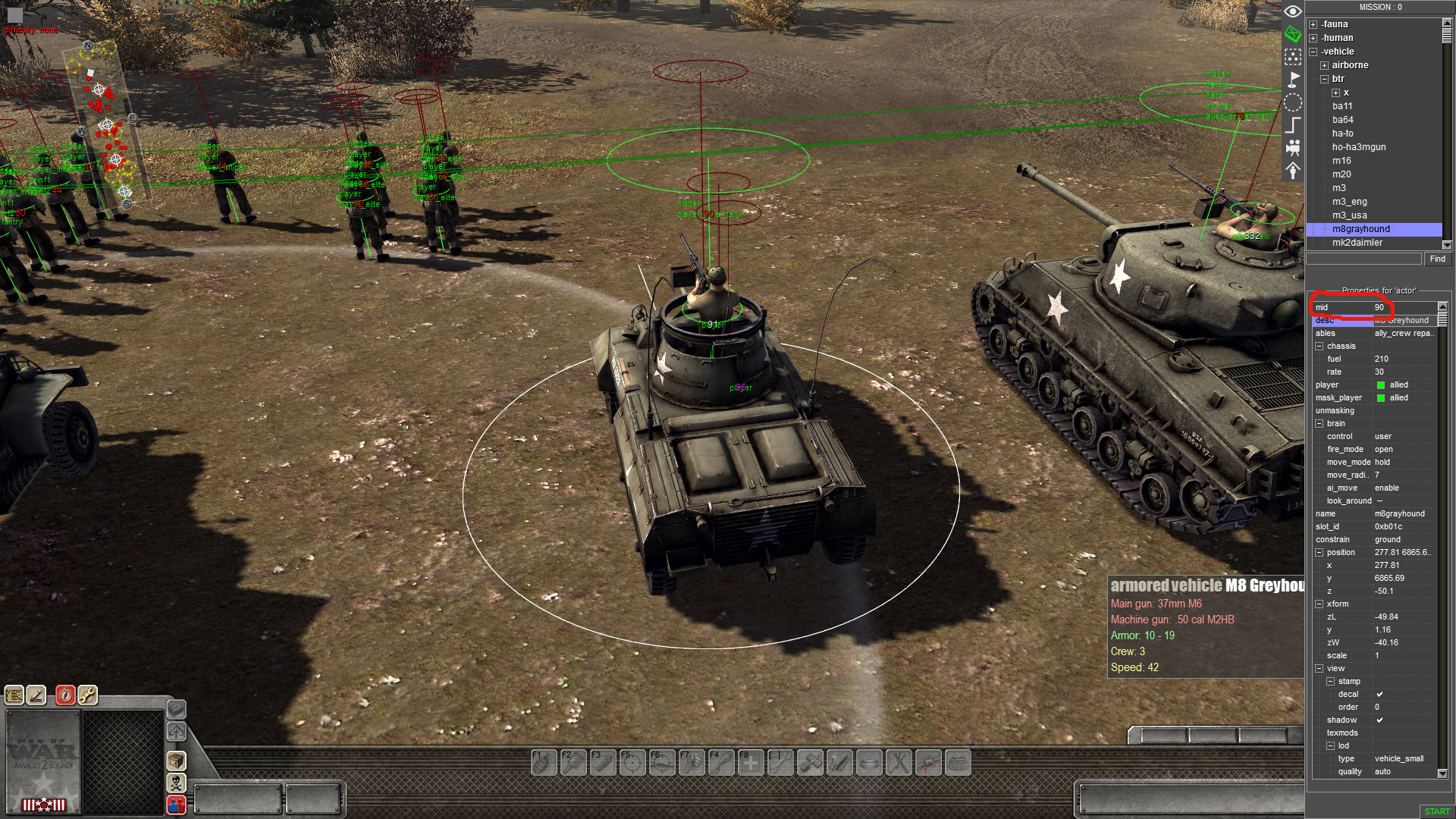
2. Find the vehicle thats used by the script, in this case its in the back and there is only one m8grayhound, select it and note the MID number which is 90 for it as shown in picture below:

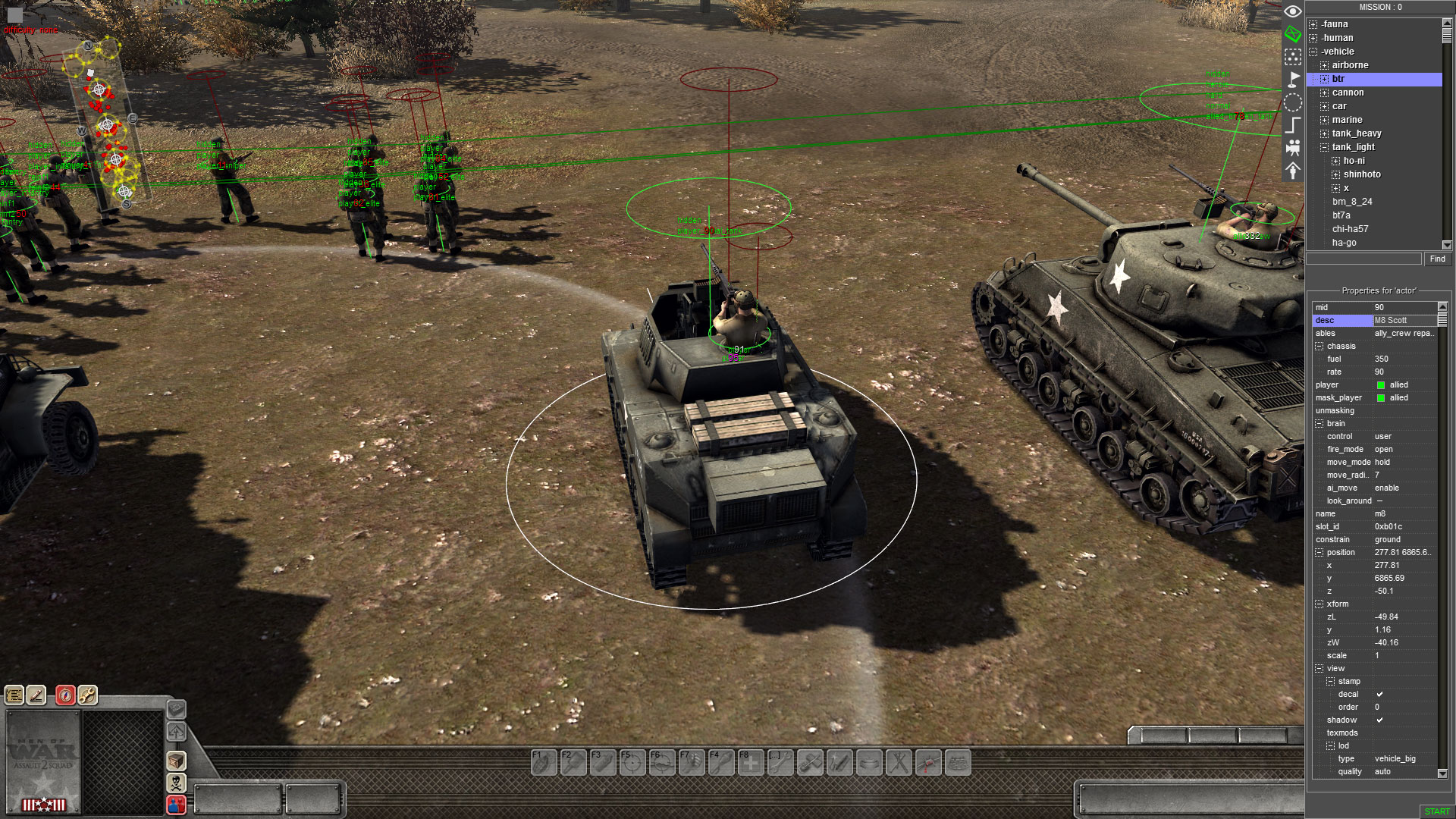
3. Now, open the 0.mi file with text editor of your choice such as notepad+ etc... and search for "mid 90}". You will see that this mid # is associated with "Entity "m8grayhound" 0xb01c" , now we want to change this vehicle to M8 Scott. In editor you can see that this entity is called "m8" so we will alter "Entity "m8grayhound" to "Entity "m8". Further, you will want to remove any lines within that entity refering to {Volume}, {texmod}(you can set texmod later) and {Extender}.
To illustrate our changes look at pic below:

4. Next, we will want to make sure if there is inventory associated with the vehicle we are changing and saved in script we will want to clear it. This will ensure new vehicle will have proper inventory.
Search script for "0xb01c" and any lines associated with inventory you will remove, in this case we find this:
{Inventory 0xb01c {box {clear} {item "repair_kit" {cell 0 0}} {item "can" filling "fuel" 60 {cell 2 0}} {item "bullet37" "ap" "ammo" 40 {cell 0 2}} {item "bullet37" "fg" "ammo" 40 {cell 3 2}} {item "bullet37" "apcr" "ammo" 5 {cell 0 3}} {item "browning" filled {cell 0 4}{user "mgun"}} {item "hmgun" "ammo" 400 {cell 4 0}} {item "mgun" "ammo" 1500 {cell 3 3}} } }
We will remove all of that text and save file in our text editor.

5. Now back in GEM editor you will want to reload the script, in F3 mode either load the 0.mi again as in step 1 or click reload.
As you can see the greyhound is now m8 scott! For purpose of this guide thats the basic method of changing vehicles in missions, Now you will notice that m8 scott will have only 3 crewmen because Greyhound originally only had 3, so you can now change this by copy paste a crewman from it and assign same tags as the crew in the tank already and then crew him in and save script, your done!

NOTE: In some cases when you change tanks there maybe cases where new vehicle will have less crew and you may have stranded left over crewman from previous vehicle etc...
12 条留言
DJSatane  [作者] 2018 年 5 月 17 日 下午 8:59 
So its anti tank gun and it cannot rotate left or right? Is it custom mod anti tank gun ? If so it may need arcs edited in the def files.
Azad 2018 年 5 月 17 日 下午 1:30 
I have a tank gun root does not work against
  right and left
DJSatane  [作者] 2018 年 5 月 17 日 上午 1:46 
Azad, whats the question?
Azad 2018 年 5 月 16 日 上午 11:52 
I have a tank gun how it changes to the right and north direction
  I tried to get something
DJSatane  [作者] 2017 年 5 月 21 日 下午 5:16 
Yes, Kha`ak, however depending on a mission you editing you want to use "T" and ensure the vehicle you replacing, its MID # is not used in script instead of tags elsewhere.
Kha'ak 2017 年 5 月 21 日 下午 4:17 
@diachinated press F1 to enter mission mode thats were your wasd keys work, in the F2 or F3 mode a and s are used to change the height or scale so they cant be used for wasd
Kha'ak 2017 年 5 月 21 日 下午 2:24 
or you just spawn in the desired vehicle and give it the desired tags -.-
diachinated 2017 年 5 月 18 日 下午 1:32 
help my awsd keys arnt working in the gem it works in regular game but not in gem creator
Uwo 2017 年 4 月 30 日 下午 1:18 
ha super than i look more in the mi file :) thx
DJSatane  [作者] 2017 年 4 月 30 日 下午 1:17 
Are you refering to the icons corresponding to selected unit on the left side or overhead icons? In addition icons in buy menu are also linked elsewhere, in .mi file in reinforcement section.