Blood II: The Chosen + Expansion

Blood II: The Chosen + Expansion

203 个评价
How to run Blood 2 on modern PCs (FIX Crashes, set 16:9/16:10 resolution and improve graphics)
由 M!Ki 制作
This tutorial will show you how to fix crashes, get rid of GFX gliches and set up your native resolution!
5
   
奖励
收藏
已收藏
取消收藏
Introduction

As you may know, Blood II The Chosen has many problems with new operating systems and modern hardware configurations. For instance, the game will crash if you're going to set up resolution higher than 1280x960 pixels.
I have spent a lot of time searching through the Internet for solutions, and i've finally found them!
In this tutorial im going to show you how to fix crashes, get rid of GFX gliches and set up your native resolution!
Let's begin
Prerequisites

1. Blood2ResPatch [dege.freeweb.hu] - modified Client.exe file, fixes game crashes on resolutions higher than 1280x960.

2. dgVoodoo2 [dege.freeweb.hu] - dgVoodoo2 is a wrapper for old graphics API's, it will fix GFX glitches in Blood II The Chosen. GPU WITH DIRECTX11 SUPPORT REQUIRED

3. Blood2_WidescreenPatch_v2 [www35.zippyshare.com] - this patch will remove stretching when playing in widescreen aspect ratios.
Installation


1. Download all those .zip archives from Prerequisites section and extract them.

2. Go to your Blood II The Chosen installation folder (in my case: D:\Steam\SteamApps\common\Blood II)

3. Move the new CLIENT.exe file that you have extracted from archive into your Blood II game folder, overwrite the file.

4. Create a new folder called "Custom" (without commas) in your Blood II game folder.

5. Move WidescreenPatch.REZ and WidescreenPatchNm.REZ files into the Custom folder that you have just created.

6. Move dgVoodooCpl.exe file into your Blood II game folder, open MS folder, then move D3DImm.dll, D3D8.dll and DDraw.dll files there as well.

7. (optional) Open dgVoodooCpl.exe file and configure settings as you prefer.

8. Run Blood II The Chosen thru steam and go to the "Advanced" tab in the game launcher.

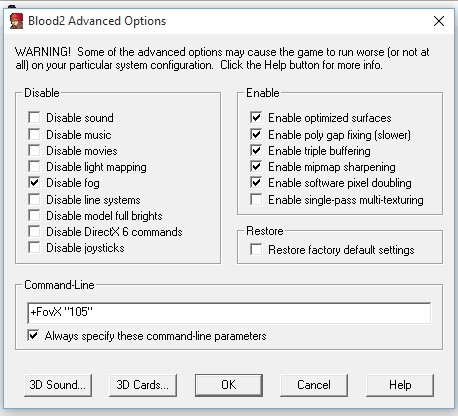
9*. Set everything just like on screenshot below:


*In the "Command-Line" section you might choose different FOV value, i have realized that "105" value is just perfect for 16:10 1680x1050 resolution.

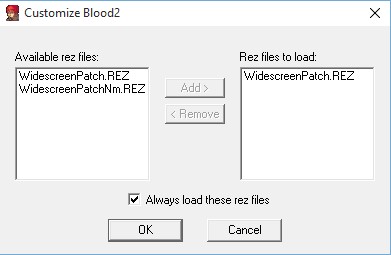
10*. Go to the "Customize" tab in the game launcher and move WidescreenPatch.REZ file to the right side, check the "Always load these rez files" box below.


*Note: If you want to play the "Nightmare" expansion, you have to replace WidescreenPatch.REZ with the WidescreenPatchNm.REZ in the game launcher (Customize tab)

11. Everything is done! Have fun playing ;-)


119 条留言
DarthPostalDude 8 月 13 日 下午 6:46 
was messing around a lot used of the patches, on my computer its like 0.1 out of 10 it decides to boot up properly.
秘境的人鱼姬 1 月 5 日 下午 10:01 
u may use steamOS to run this game.
SlenderKnirpZ 2024 年 11 月 17 日 上午 5:30 
SO 9(!) for ME personly I guess frustarting steps:steamfacepalm:,I have to do.Why no lil Workshop,Maps,Mods HERE straight and easy on Steam?! 1-2 Mouseclicks done!
troubleShooter 2024 年 8 月 21 日 下午 12:09 
links incorrect/dead. updated by quick googling:
{链接已删除}
{链接已删除}
https://www.moddb.com/games/blood-2-the-chosen/downloads/blood2widescreenpatchv2

offtopic:
trying to beat oooold win game launch om macbook with Whisky (Wine). -_-
macmac 2024 年 7 月 14 日 上午 7:27 
All links 404.. not helpful.
DEUSANAVIT 2024 年 7 月 3 日 上午 2:01 
I did all of that and my game still crashes. I knew things were gonna be bad but not THIS bad...
Dellou 2024 年 5 月 27 日 上午 8:53 
Not Found
The requested URL was not found on this server.

Additionally, a 404 Not Found error was encountered while trying to use an ErrorDocument to handle the request.
Alptraum 2024 年 3 月 25 日 上午 11:58 
Did everything you said the game launches but i don't get full screen. Heck, i cannot even get to see main menu!
xjosephx 2024 年 2 月 3 日 下午 2:24 
@kaos89 I haven't played this game in years, and just decided to play it again int the last 30 mins. I saw that the download links above were dead and thought, ah well that's that - then I see you saved the day by posting an hour ago for some spooky reason. Thank you!!
Kaos89 2024 年 2 月 3 日 下午 12:45 
Part 2

I did not need to check anything like this guide says in step 9. - Leave everything unchecked in step 9 but do the following in the advance line. +ScreenWidth 2560 +ScreenHeight 1440 +FovX 100 per Set the resolution to whatever resolution you are using except 4k.

I found running the game at 4k it does not work correctly. I believe the max res you can go following this guide is 1440p. After doing all that I was able to get the game to work along with hd textures following per blood 2 pc gaming wiki

I hope this helps, enjoy!