Garry's Mod

Garry's Mod

167 vurderinger
GShake - New generation shake (API)
   
Pris
Føj til foretrukne
Gjort til foretrukken
Fjern som foretrukken
Content Type: Addon
Addon Type: Effects
Addon Tags: Movie, Scenic, Realism
Filstørrelse:
Offentliggjort:
Opdateret:
19.795 KB
16. nov. kl. 7:25
16. nov. kl. 23:53
3 ændringsbemærkninger ( vis )

Abonner for at downloade
GShake - New generation shake (API)

Beskrivelse
(It took about a year to make this addon :3)
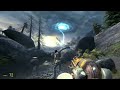
Tired of GMod's default, jerky screen shake? Ever felt like a massive explosion should feel more... explosive? Or that a Strider walking past should rattle your bones?

Well, this addon fixes that.

It completely replaces the default util.ScreenShake function with a new, smooth, trauma-based system. This makes all shakes feel more natural, responsive, and (most importantly) awesome.


What This Addon Does
    [] Replaces the Core Shake: Say goodbye to the janky default shake. This new system is smooth and uses a "trauma" value that decays over time, just like in modern AAA games. [] Dynamic NPC Shakes: NPCs now cause screen shake!
      [] Striders: Feel their heavy footsteps and the power of their warp cannon. [] Gunships, Helicopters & Dropships: Their rotors create a rumble effect when they fly close to you (it even checks line-of-sight!).
    [] Better Explosions: All standard HL2 explosions (grenades, RPGs, explosive barrels, etc.) now use the new system and have carefully tuned values for max impact. [] Map Integration: Automatically hooks into map-based env_shake entities, upgrading them to the new smooth system instantly.
  • Developer Friendly: Comes with a simple API and easy-to-edit config files so you can add your own custom shakes for other addons or entities.


How To Use It
For Players: Just subscribe and you're done! Seriously, that's it. It works out of the box.
For Servers: This addon is required by both the server and all clients. Make sure you add it to your server's workshop collection so everyone downloads it.


Customization (For Players)
Hey, so what if you're a driver who gets carsick? No problem.
By default, all these awesome new shakes work even when you're in a vehicle. If you'd rather not have your screen rattle while you're trying to pull off a sweet jump, you can easily turn it off.
Just open your console (the ~ key) and type:
GShake_AllowShakeInVehicle 0
That's it! All shakes will be blocked as long as you're in a driver's seat.
Want it back on? Just set it back to 1:
GShake_AllowShakeInVehicle 1
You're in control!


How To Add Your Own Shakes (For Devs)
This is the "how to do everything" part. It's super easy to add your own shakes for other addons or props.
Method 1: The Config File (Easy Mode)
The easiest way is to edit the config file. You'll find it in the addon folder at: lua/autorun/hl2naetcs.lua (You might have a different file name, but it's the one with all the tables!)
Inside, you'll see two tables: ExplosiveEntities and DestructibleShake.
To add a new prop that shakes when it breaks: Add a new line to the DestructibleShake table. You just need the prop's model path.
DestructibleShake = { -- ... all the default ones ... -- Add your line here! ["models/my_cool_addon/explosive_thing.mdl"] = { maxAmplitude = 20.0, minAmplitude = 2.0, frequency = 5.0, duration = 1.5, radius = 500 }, }
To add a new explosive entity (like a custom grenade): Add a new line to the ExplosiveEntities table. You just need the entity's class name.
ExplosiveEntities = { -- ... all the default ones ... -- Add your line here! ["my_custom_grenade"] = { maxAmplitude = 30.0, minAmplitude = 5.0, frequency = 4.0, duration = 2.0, radius = 700 }, }
Table Key:
    [] maxAmplitude: How strong the shake is at its center (max strength). [] minAmplitude: (For explosions) The minimum random strength. It picks a value between min and max. [] frequency: How "fast" the shake is. Higher = more jittery. [] duration: How long the shake lasts in seconds.
  • radius: How far away you can feel the shake from.
Method 2: Calling it From Your Own LUA (Advanced)
Since this addon overwrites the default util.ScreenShake, you can just call the normal function from your own LUA code and it will automatically use the new system!
-- This will create a shake at the entity's position if ( IsValid(MyEntity) ) then local pos = MyEntity:GetPos() local amplitude = 10 local frequency = 5 local duration = 2 local radius = 1000 util.ScreenShake(pos, amplitude, frequency, duration, radius) end


Compatibility
This addon WILL CONFLICT with any other addon that tries to modify or replace util.ScreenShake. You can only have one "shake overhaul" addon at a time.

Other than that, it should be compatible with pretty much everything!
Enjoy the shakes!
40 kommentarer
Radixliner For 20 timer siden 
for mw base users, use this to fix viewmodel weapon for disappearing (although its not perfect)
https://psteamcommunity.yuanyoumao.com/sharedfiles/filedetails/?id=3570102124&searchtext=mw+base+calcview
Theodore Peterson 27. nov. kl. 19:00 
any way to turn down instensity?
ApexOfOblivion 26. nov. kl. 14:36 
it makes my mw base weapons disappear whenever something is shaking
Moldy. 24. nov. kl. 15:24 
Well you replied, then I guess this mod still has a future
LSCORE | Kivi🥝  [ophavsmand] 23. nov. kl. 18:14 
Moldy. I'll be making a patch. I'm currently busy coding mod for Half-Life 2
Relira 23. nov. kl. 16:37 
I think because some vmanip animations have a little bit of screen movement to them. I could be wrong and misremembering things but either way, this mod doesn't support ♥♥♥♥ and it seems like the creator will do nothing about that
Moldy. 22. nov. kl. 20:53 
dont understand why this conflicts with vmanip animations, the shake will cause animations stuck for no reason
mateu 22. nov. kl. 11:40 
this is breaking glide`s camera :(
Mannytko 22. nov. kl. 5:08 
:3
Seal Of Approval 21. nov. kl. 22:50 
the shake...
YES!