《质量效应》传奇版

《质量效应》传奇版

115 个评价
Disable EA/Origin Requirement
由 GDomo 制作
This guide covers how to play Mass Effect: Legendary Edition without needing either the EA Launcher or Origin to be installed.
10
3
5
2
2
   
奖励
收藏
已收藏
取消收藏
Pre-Setup
Since there only seem to be guides on replacing the EA app with Origin instead of removing both entirely, I am making this guide to show how the game can be played through Steam without any secondary launcher. This also means offline play should work as expected.

Steam relies on the EA launcher to communicate achievement information. Because of this, removing the EA launcher will also prevent achievements from being unlocked on Steam. There is not currently a good way to circumvent this, so I have left a subpar alternative at the end of the guide if you would rather have achievements at the cost of keeping the launcher.

Before doing anything else, make sure you have a fresh install of Mass Effect: Legendary Edition, ideally without Origin or the EA Launcher installed on your PC. If you have slow internet, just verifying the integrity of your files via the game properties menu should be fine.

This guide is written with the assumption that you are using a genuine copy of the game bought through Steam. This does not change or remove Steam's DRM for ME:LE in any way.
Patching Game Files
Download the archive from here[drive.google.com]. Unzip the file using WinRAR, 7-Zip, or the built-in extractor in File Explorer. Extract all the files to the game's directory and click to replace all files when prompted. If you don't know how to find the game's directory, right click on ME:LE in your Steam library, then click on "Browse game files".

This will replace the executable file for the launcher and each of the three games with a patched version that makes the game believe the user has Origin/EA installed and open (thanks to anadius's origin emulator tool). This also changes the game's install config to not try to install the EA App whenever the game is opened, via installscript.vdf.


For those who want to do the patching process themselves without relying on outside executables, there is a detailed guide by YoteZip on Github[github.com] which shows how to patch your own copy of the game. Keep in mind that you will still need to edit the game's install script to prevent Steam from installing the EA app at launch.
Patching Launch Config via SteamEdit
Now that you've installed the patched game files, the game should launch as expected via the launcher executable. However, Steam still expects to interface with the EA App in order to launch the game, meaning you will get an error if you try to launch ME:LE through Steam directly. To fix this, we will need to tell Steam how to open the game.

Download the latest version of SteamEdit from the official website[steamedit.tg-software.com]. Unpack the archive with whatever tool you like, then extract the files wherever. Launch the SteamEdit executable. Use the search bar to find and select ME:LE. Click "Edit Launch". From here, we can tell Steam what executable it should open when it starts ME:LE.

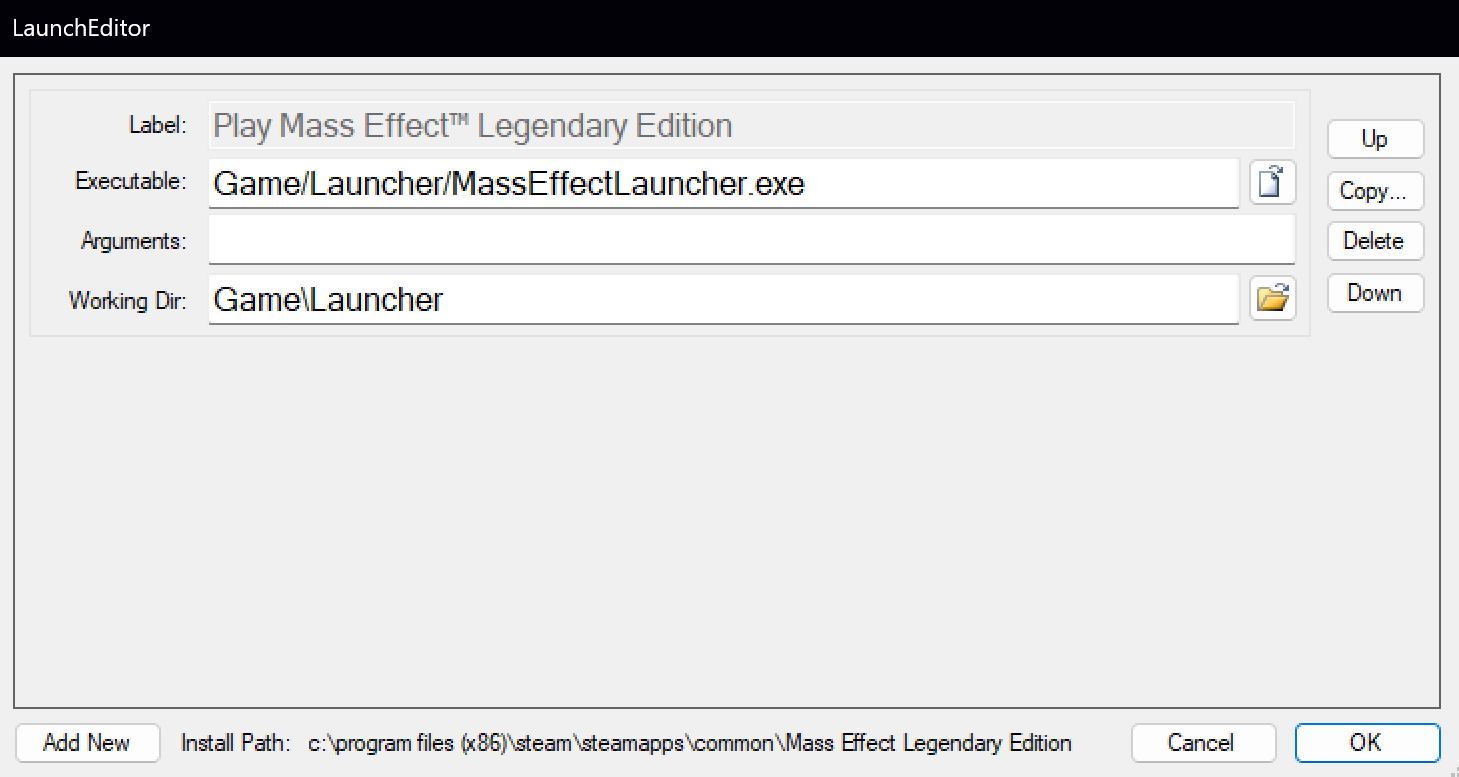
In the Executable box, delete whatever is already in there, and paste:

Game/Launcher/MassEffectLauncher.exe

In the Working Directory box, paste:

Game\Launcher


Afterwards, your menu should look like this:

If everything matches, click OK to close the menu. Click "Save & Apply & Restart" at the top left. Once Steam has opened, you can close and/or delete SteamEdit.

Now, launch the game through Steam. ME:LE should open and work as expected now. If you have EA/Origin installed, you can go ahead and uninstall it if you like.
Extras
You may notice that the username is shown as "User" in the main menus. This is due to the fact that we are now "emulating" Origin, which means no real account is being used. While this doesn't really matter in ME:LE, you can still change the shown username if you want to.

To do this, go into your game's directory, open the Launcher folder, then open "anadius.cfg". There will be a line titled "Username" near the bottom, change "User" to your desired username then save. It should appear as whatever you changed it to whenever you next launch the game.
"Alternative" Method w/ Achievements
If you still want to get Steam achievements, you will unfortunately need the EA app and service open during gameplay. There is currently no way around this that I am aware of. However, you can minimize the amount of time EA's software is running. If you run the game through Steam like normal, the EA app will open for the game, and completely close itself once the game exits. The only thing that continues running afterward is EA's background service, which runs constantly to check for updates and other things. If you want everything to be contained within the runtime of the game itself, you can use the following batch script:


@echo off

start "" "link2ea://launchgame/1328670?platform=steam"

timeout /t 30 /nobreak>nul

:loop

cls
tasklist /FI "IMAGENAME eq MassEffectLauncher.exe" | findstr "MassEffectLauncher.exe" >nul
if %errorlevel% == 0 (
echo Mass Effect is still open
) else (
net stop EABackgroundService
exit
)

timeout /T 5 /nobreak>nul
goto loop


Simply create a text document in your game folder, paste the script inside it, then save the text file as a .bat file. When you run the script, it will open the game via Steam, then will regularly check to see if the game is running. Whenever the game closes, the script will stop EA's background service and close itself. You can add this line to ME:LE's launch options in Steam to make the script run whenever you run the game directly through Steam:

"path/to/file.bat" ; %command%

Replace the path with the path to .bat file you created. You can get this by shift-right-clicking on the file, then clicking "Copy as path". Keep in mind that there needs to be a space between the path and the semicolon, or Windows will read the path incorrectly.
30 条留言
MrGeeBee 13 小时以前 
SteamEdit shows the wrong install path, how do you edit that?
Exiled Hermit 11 月 30 日 下午 3:56 
Thank you.
nine 11 月 28 日 下午 5:44 
sigue funcionando, gracias :steamthumbsup:, ojala quiten los launchers de terceros algun dia
e҉xxentrix 11 月 20 日 下午 12:06 
I made it work on Linux.
Had to slightly adjust steps. I'm not sure if SteamEdits is even needed.
I ended up adding the new Launcher exe as a non-Steam game and launched from that after the SteamEdit gave me an error when I tried to save the changes.
✝🎄papasmurfmusdie🎄✝ 10 月 20 日 下午 6:57 
Huh? I haven't had to use the EA App for Mass Effect for quite some time..... Then again, Linux might skip over it lol
Broth3rIamPinn3d 10 月 20 日 上午 11:46 
Followed the instructions, worked for a bit and now after a week and installing mods it doesnt work anymore what did i do wrong
Septimus-Prime 10 月 6 日 上午 9:28 
I followed every last step very precisely, steam achievements still not activating.
Tucznik 10 月 3 日 下午 1:26 
Yeah, the game launches without origin/ea app but i still can`t play it. Im in the menu, starting the first game, it is loading for a while, then kicks me back to the desktop, then back into the menu. Anyone could help me?
Namenlos 10 月 1 日 上午 2:52 
Stil working great. Refused to Launch before because of the Launcher and now everything just works.
Sean2111 9 月 18 日 下午 7:48 
This bit -Patching Launch Config via SteamEdit ,
can this be bypassed just by using a steam launch parameter -
like

"C:\Program Files (x86)\Steam\steamapps\common\Call of Duty Advanced Warfare\alterware-launcher-x86.exe" s1-mod %command%

which is for another game i play -just as an example?