雨世界

雨世界

28 个评价
How to add custom meows in Push to Meow for your custom Slugcats
由 andreweathan 制作
this epic guide details how to make your own custom slugcat mod have custom meow sounds when used with Push to Meow :))))
(this guide also explains how you can use Push to Meow's configurations to replace existing meow sounds)

(NOTE: this mod assumes you already have a basic understanding of Rain World modding in the "adding custom meow sounds" section)

Push to Meow mod by me and Cioss :) https://psteamcommunity.yuanyoumao.com/sharedfiles/filedetails/?id=3257541402
   
奖励
收藏
已收藏
取消收藏
How Push to Meow loads custom meows
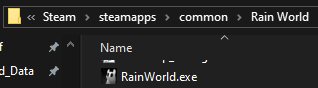
(for reference, "Rain World" in a file path is the folder in which the game's files are stored)


Push to Meow uses Rain World's SoundID system to play sounds. When loading custom meows, it searches for the existence of the file pushtomeow/custom_meows.json in both the game's assets folder (Rain World/RainWorld_Data/StreamingAssets) and in every downloaded & local mod's folder.

Downloaded mods are usually located at (steam path)/steamapps/workshop/content/312520/(mod id)/, and Push to Meow searches inside of the mods' folders for the pushtomeow/custom_meows.json file.

Push to Meow itself contains a pushtomeow/custom_meows.json file, and it looks like this:

{ "priority": -1, "custom_meows": [ { "slugcat_id": "White", "short_meow_soundid": "SlugcatMeowNormalShort", "long_meow_soundid": "SlugcatMeowNormal", "short_meow_pup_soundid": "SlugcatMeowPupShort", "long_meow_pup_soundid": "SlugcatMeowPup" }, { "slugcat_id": "Gourmand", "short_meow_soundid": "SlugcatMeowFatShort", "long_meow_soundid": "SlugcatMeowFat", "volume_multiplier": 1.15 }, (..... more text hidden ......) { "slugcat_id": "Red", "short_meow_soundid": "SlugcatMeowNormalShort", "long_meow_soundid": "SlugcatMeowNormal", "short_meow_pup_soundid": "SlugcatMeowPupShort", "long_meow_pup_soundid": "SlugcatMeowPup" } ] }

you can see that for example, slugcat ID "White" (Survivor) is assigned SoundID SlugcatMeowNormal for long meows and SlugcatMeowNormalShort for short meows, and likewise for the pup variants. If custom sounds aren't specified for the pup variants (like for Gourmand and others), the mod just plays a higher pitched version of the normal variant.

You can change a custom meow sound's volume using the volume_multiplier property!

Also, the priority property (default value: 0) specifies the loading priority of the custom_meows.json file that is currently being read by the mod. This means that if you want to overwrite the default meow sounds in Push to Meow, your files will, by default, have a priority of 0, while Push to Meow has a priority of -1, meaning that if you add an already-existing slugcat ID in your JSON file, it will overwrite the existing one:


Rain World/RainWorld_Data/StreamingAssets/pushtomeow/custom_meows.json from the above example:
{ "custom_meows": [ { "slugcat_id": "White", "short_meow_soundid": "SlugcatMeowRivuletShort", "long_meow_soundid": "SlugcatMeowRivulet", "volume_multiplier": 0.95 } ] }
Adding your own custom meow sounds
(for the guide example, i created a custom meow sound for this mod: https://psteamcommunity.yuanyoumao.com/workshop/filedetails/?id=3254975454)

To add a custom meow sound, follow these steps:
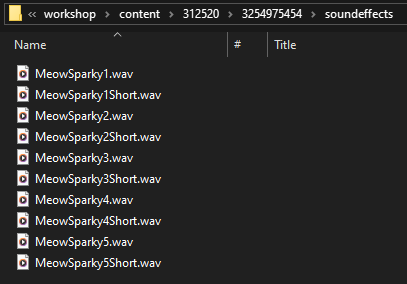
  • In your mod's folder or Rain World/RainWorld_Data/StreamingAssets folder, create a soundeffects folder and add all your custom .wav meow sound files:


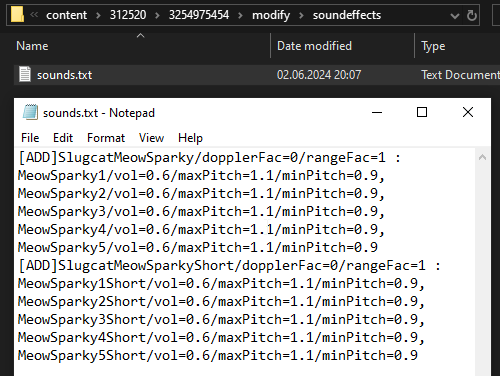
  • Create the file modify/soundeffects/sounds.txt. Inside of it, add the SoundIDs needed to register the sound files you added, like this:
    [ADD]SlugcatMeowSparky/dopplerFac=0/rangeFac=1 : MeowSparky1/vol=0.6/maxPitch=1.1/minPitch=0.9, MeowSparky2/vol=0.6/maxPitch=1.1/minPitch=0.9, MeowSparky3/vol=0.6/maxPitch=1.1/minPitch=0.9, MeowSparky4/vol=0.6/maxPitch=1.1/minPitch=0.9, MeowSparky5/vol=0.6/maxPitch=1.1/minPitch=0.9 [ADD]SlugcatMeowSparkyShort/dopplerFac=0/rangeFac=1 : MeowSparky1Short/vol=0.6/maxPitch=1.1/minPitch=0.9, MeowSparky2Short/vol=0.6/maxPitch=1.1/minPitch=0.9, MeowSparky3Short/vol=0.6/maxPitch=1.1/minPitch=0.9, MeowSparky4Short/vol=0.6/maxPitch=1.1/minPitch=0.9, MeowSparky5Short/vol=0.6/maxPitch=1.1/minPitch=0.9
    (the MeowSparky(number) and MeowSparky(number)Short files are the names of the sound files you added in the first step, without the .wav extension)
    Make sure to change "Sparky" in the files to your custom slugcat's name!

    NOTE: keep in mind that the sounds.txt file's lines should all start with [ADD]! Make sure to keep every sound file per SoundID on the same line or it won't be loaded by the game.
    It should look something like this:
    [ADD]YourMeow/blah/blah: Meow1/blah, Meow2/blah, Meow3/blah [ADD]YourMeowShort/blah: MeowShort1/blah
    NOTE 2: Be careful to name your SoundIDs something different than "Meow(slugcat)" and "Meow(slugcat)Short". Push to Meow already uses SoundIDs like MeowWatcher, MeowRivuletShort and so on, so if you use the same SoundIDs, your mod's sounds would risk being overwritten by Push to Meow's identical sound IDs due to mod priority, regardless of the "priority" value in your custom_meows.json. Mod priority shouldn't have to affect how sounds are loaded, since PtM doesn't rely on mod priorities to load custom meows!


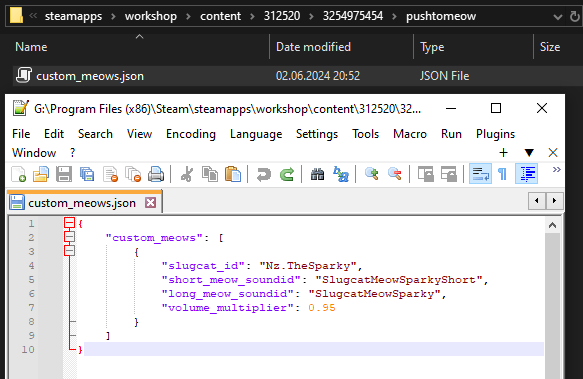
  • Create the file pushtomeow/custom_meows.json and register your custom meow like this:
    { "custom_meows": [ { "slugcat_id": "Nz.TheSparky", "short_meow_soundid": "SlugcatMeowSparkyShort", "long_meow_soundid": "SlugcatMeowSparky", "volume_multiplier": 0.95 } ] }
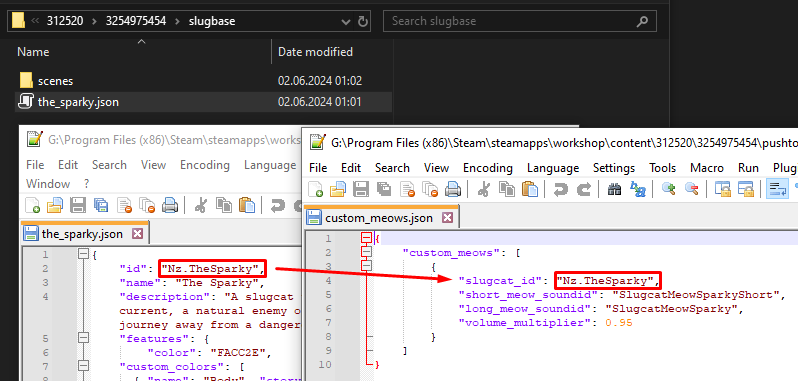
    Replace the SoundIDs with your own, and replace Nz.TheSparky with your custom slugcat's ID. If you use slugbase, the ID is this:

    Also, set volume_multiplier to whatever you think sounds the best. While working on the mod, i went in Arena and set my custom slugcat as Player 2 alongside Player 1 as the Survivor so that i could compare their meow volumes for reference.

    If you have pup variants of your custom meow sounds, add them to the sounds.txt file from earlier, and assign the new SoundIDs to short_meow_pup_soundid and long_meow_pup_soundid in custom_meows.json.
Replacing existing meow sounds with other sounds
To replace existing meow sounds, you can follow the steps above to add a new custom meow sound, with some changes:
  • In your custom_meows.json file, set your priority value to something higher than -1. This means that your file's custom meows will overwrite any others that have a lower priority!
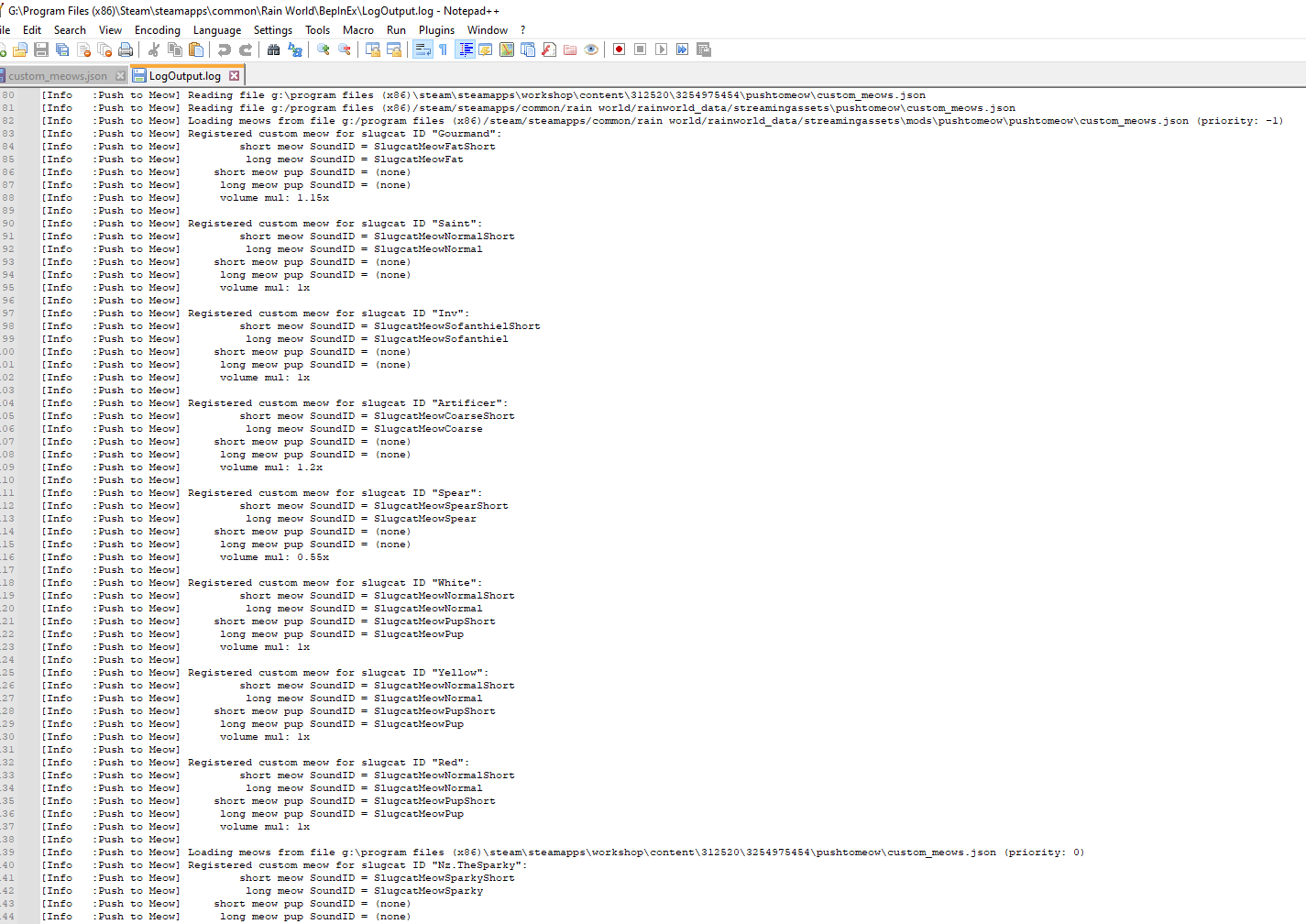
    To overwrite default Push to Meow sounds, use a priority of 0. To overwrite default sounds and other mods' sounds, use a higher priority value than the mods (for example, 10000). You can check other mods' priority values by opening Rain World/BepInEx/LogOutput.log and scrolling until you see Push to Meow loading custom meows:

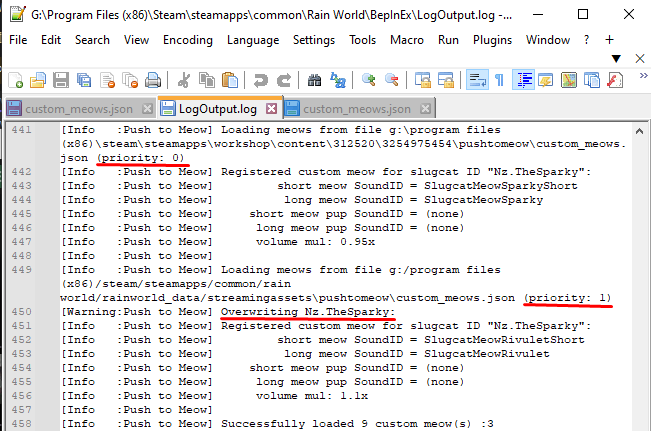
    Each custom_meows.json file has its own priority, and for example, if you want to overwrite the Nz.TheSparky custom meow, which has a priority of 0, all you have to do is give your custom_meows.json file a priority of 1:
Creating custom meow sounds
To create custom meow sounds, you can either use your own sound effects, or apply effects to the default Push to Meow meow sounds to create something new!
You can find Push to Meow's meow sounds in:
14 条留言
ᚱᛟᚷ ∵ 💜💀🤖 6 月 4 日 下午 2:38 
I managed to figure this out thanks to your guide! Works perfect!
some mircowave 5 月 17 日 上午 10:34 
the sound isn't playing even when it says it has the ID recongized in the remix menu, and when the BepInEx log file does

dhewjfduhweuhfdsjguwefhdjsgfweu
andreweathan  [作者] 2024 年 9 月 7 日 上午 8:37 
@AlbatrossThePenChewer the custom meow json lets you specify separate long/short custom meow sounds for both slugpups and adult slugcats of a certain ID (White, Red, Rivulet, etc), but if ur talking about having different sounds for slugpup npcs compared to slugpup players i didnt add a feature like that to ptm sadly
AlbatrossThePenChewer 2024 年 9 月 6 日 下午 2:17 
Hi! I'm trying to add a custom meow specifically for Slugpup NPCs, but I'm stuck since the custom meow json only seems to have options for player characters. Is there a specific ID I can point to, or is assigning Slugpup NPC meows a bit more complicated than that?
Twat 2024 年 8 月 1 日 下午 10:10 
they were being added the sound just wasnt playing
but i did that too, maybe the files were just too long
andreweathan  [作者] 2024 年 8 月 1 日 下午 3:56 
did u make sure to check that your modify/soundeffects/sounds.txt file has all of the text for each custom meow sound on a single line? (like in the note that i put in the guide)
also could u check the push to meow settings's second tab to see if your sounds are being added?
Twat 2024 年 7 月 31 日 上午 12:59 
i followed all the steps but the sound just wasnt playing in game and idk why
yeetin8tor 2024 年 7 月 25 日 上午 2:53 
:3
ConEntity 2024 年 6 月 27 日 上午 11:30 
But how I drag the meow sounds out...
Hunter 2024 年 6 月 14 日 下午 8:25 
Yowl