STAR WARS™ Empire at War: Gold Pack

STAR WARS™ Empire at War: Gold Pack

180 个评价
How To Increase Space Battle Unit Cap [On Any Mod* - Super Easy!]
由 Sausage and mash 制作
How to quickly increase Tactical Space Battle Unit Cap on any empire at war overhaul mod* (No Coding or Software Downloads required) Super easy!
7
4
2
3
   
奖励
收藏
已收藏
取消收藏
Tired of low unit pop caps on your favourite mods?
This guide will show you how to Super easily and quickly modify your unit cap on any mod for any faction without needing to download anything, use any software other then windows notepad, and can be done within a minute or two. You don't need to create a mod, or spend hours writing any code whatsoever, all you need is to change one number in one file within the mod files.

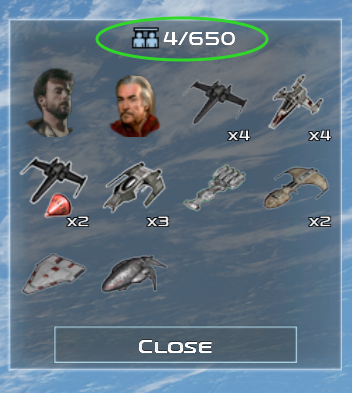
Finished product:


vVv


(i changed my unit cap to 650, but you could change it to 500, 1000, 2000...)

BUT WAIT! -

Before you race off looking down below here's a few important things to keep in mind.

- For those more familiar with mod files, there are quicker ways of doing this like using software such as notepad++, this guide is meant for those who are not well versed with mods and mod files who want an EASY and fairly quick way of getting what they want without stressing about anything else.

- ***DO NOT attempt this while the game is currently open/running, only edit game/mod files when you are not playing the game.

- This should work with any overhaul mod for EAW, I've tested this on Thrawns Revenge, Awakening of the Rebellion and the Remake Mod, all of which worked perfectly with no issues.

- ***If you update the mod, or re-download it, you will need to do this again, but this is not an issue as it only takes a minute. likewise, if you make a mistake and change something in the files you shouldn't have by accident; or you run into issues, you can simply re-download the mod to undo any changes and get the original version of the mod back.

- I have tested this with saves on these 3 mods to see if it corrupts any pre-existing save files after changing the unit cap in the files, and every time it has worked with no issues and I've never had a save corrupted because of doing this. NONE THE LESS > whilst it should work for all other mods without any breaks to saves, i haven't tested it, so proceed with caution... i have warned you, but it should be fine.

- ***This is only for changing the Space Battle unit cap, not land battle unit cap, This is also not a guide for changing Galactic Unit build Cap, (total unit build cap), for those you should look elsewhere for guides.
Lets get down to buisness
here's the Step by Step of how this works:

1.
Open up your SteamLibrary file / 'steam' file wherever it is on your own computer, click on it and then go into Steamapps > Workshop > Content, once in Content, there will be multiple files named a bunch of numbers, these are the individual steam game mods files containing all your downloaded mods, split into their respective games. If you know how to find the empire at war mod folder and the mod folder you wish to modify you can skip the next 3 paragraphs (go to part 2).

You now need to find your Starwars empire at war mod folder, however like i said it wont be called this but will instead be named a number in your content file, for example my empire at war mod folder is named '32470' but your file will likely be different. You may need to look through each of these files to find the right one, you can do this by looking through the numbered files (individual game mod folders) within these files to find out stuff about the mods within and find the right game eg: related thumbnails, names, etc, this may seem like a hassle depending on how many games you have downloaded but it should be easy once you've found the right one.

If you're still struggling with this there will likely be other guides or videos on steam or youtube explaining this generally in more depth (this is basic stuff once you know how this works you'll find it super easy to do again).

Once you've found the right game folder you will then need to find the mod folder for the specific mod you wish to modify, eg: Thrawns Revenge or Remake for example. Once again they will be named a number, and you will have to find the right one, if you only have two mods downloaded for example this will be easy as there will only be two mod files to look through. An example of what to look for: the AOTR mod has an obvious AOTR thumbnail in the first set of files that is a dead giveaway, it will be similar for other mods but you may have to look a little closer at the files and their names.

2.
Once you've found the mod folder of the mod you wish to change the unit cap of you can proceed with the next steps.

As an example in the images i'm using The Remake Mod, these next few steps should apply to any mod your using as they should all use a very similar file layout

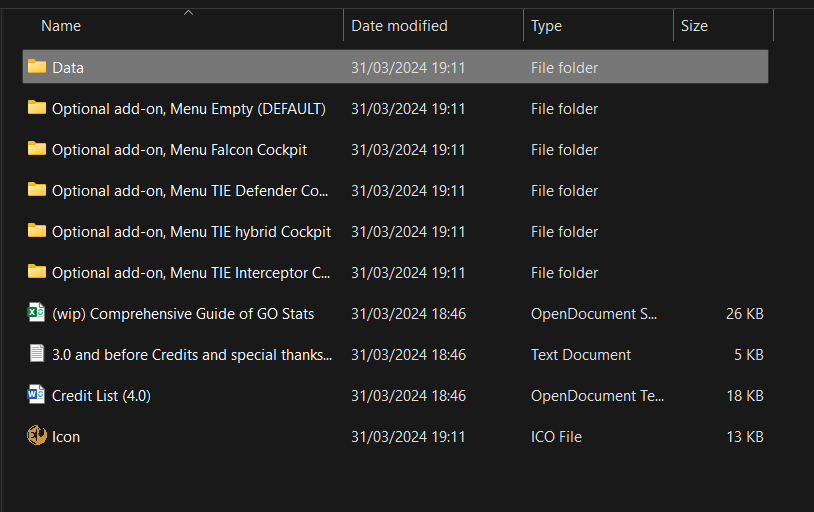
The mod folder you're now looking at should look like the one below, or at least similar.

Click on the file named 'data', (Highlighted) [if its not called 'data' it should be called something similar]:


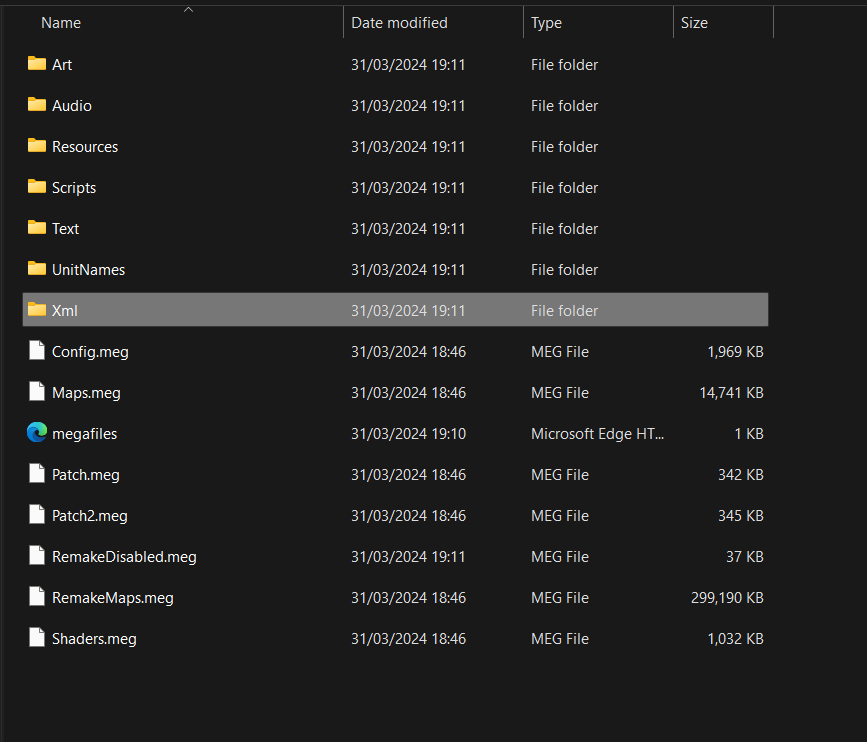
Next Click on the file named Xml (XML):


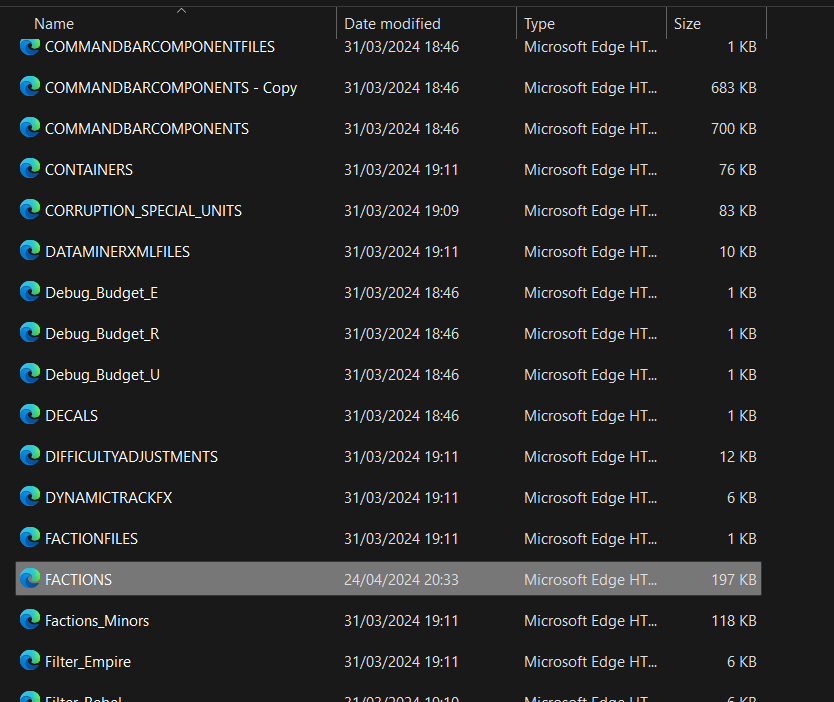
Next you should see alot of individual files, ignore the folders at the top and scroll down through the files till you find one called 'FACTIONS' (or factions), ignore any files called 'FACTIONFILES' unless the 'Factions' file is empty/very small or missing. The files are alphabetically ordered so scroll down till you reach 'F', you only need to find this one file, the file should look like this, (ignore the Microsoft edge logo) [highlighted]:


Now right click on the file name, and click 'show more options' and then click 'edit with notepad' or just edit with notepad if it comes up first.

3.
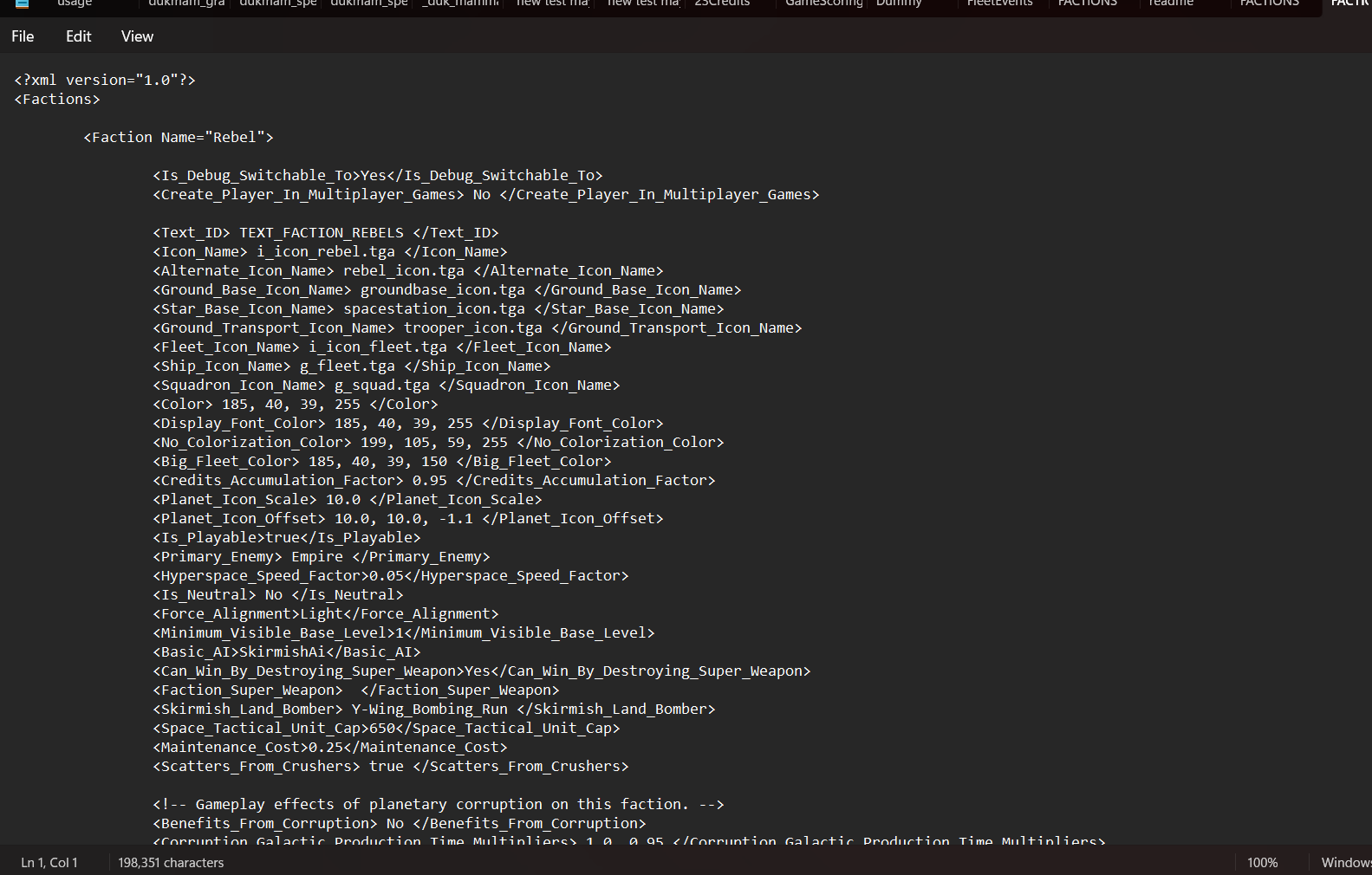
You should now have the file open with notepad and it should look like this (mine is in dark mode):


You can now edit the text in this file and save it to change the original file, be careful not to accidentally change anything, you're only going to edit one number in one line of text*.

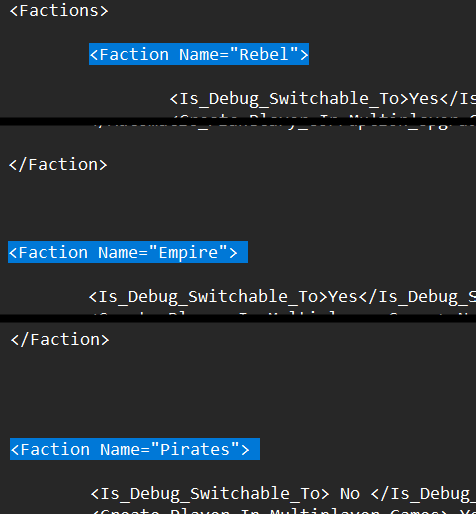
At the top or near the top there should be text that says 'Faction' and then 'Faction (faction name eg: empire)' like on the image.

All the existing factions on the mod will be displayed here, if there are only 3 factions on the mod then only 3 factions will be displayed with their data here, if there are 5 there will be 5 factions etc (independent and pirate forces both count as factions respectively).

For example this is what you're looking for for each faction:


Now there is a lot of text in this file but don't be deterred as like i said you just need to find one line of text. it should be in the first chunk of text below the faction name, or not far from it, each faction will be laid out slightly differently so it may be in slightly different locations for each faction in the file. Also to note, if there are any factions other than the empire, rebels or criminal underworld/black sun then they may just be named 'faction1' or something similar, (the 'black sun' faction is sometimes named differently in different mods).

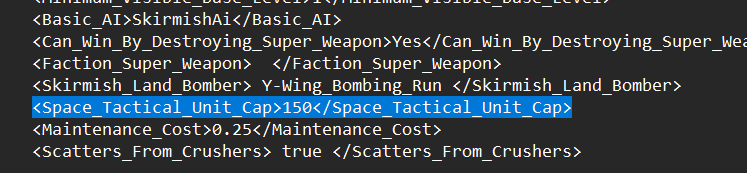
The line of text/code you're looking for is this (highlighted below):


*<Space_Tactical_Unit_Cap>*number*</Space_Tactical_Unit_Cap>*

The number in the middle is the only thing you want to change, and you can change it to basically anything.

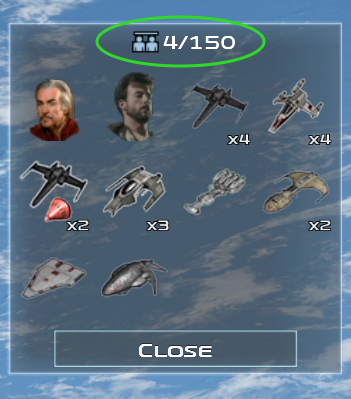
For example currently with the number at 150, when i got into battle in the game the space battle unit cap will be, who would have guessed, 150! as you can see in-game below:


Where as if i were to change it to 650 for example, which is what i would recommend for a decent spec PC like mine to avoid major lag/crashes*, or something similar:


Then it will be 650 in-game:


If you want to make the unit cap Infinite like many mods do, then set it to 9999, (practically infinite):


But i wouldn't recommend doing this unless you have a NASA computer, or else it will lag and crash your game into oblivion with too many ships active.

- If you only wish to change the unit cap of one faction, then just find and change the one, but if you want to change it for all you'll have to scroll through and change each one for each faction you wish to change.

Once you've changed the number to the unit cap you desire, you need to save the changes, don't click 'save as', just click save and then exit the file ('save as' would make a new file if renamed which you do not want to do). Once again, do not do any of this with the game open, only do this with the game closed/not running, once you've made the changes and closed the files, you are safe to play.

And again if the game seems to be broken after doing this, or it hasn't worked, you almost 100% did something wrong, so re-download the mod on steam, and repeat the guide again.
So Long! Farewell! Auf wiedersehen Goodbye!
Any questions feel free to ask, a thumbs up and favourite would be appreciated, (and also make it easier to find this guide again in case you forget how to do this!).

Once again make sure you read the first few paragraphs, important info!

*And like i said this should work for all overhaul mods for the game.

This has been sausage and mash, channel 66 news, back to you at the studio...

.
38 条留言
shadowhawk4321 11 月 21 日 下午 9:35 
how do u change the ground unit cap.
Sausage and mash  [作者] 11 月 6 日 下午 7:26 
@Aperture yes this will also effect the AI unit cap, any faction you change the cap of will be effected regardless of whether that faction is being played by a real player or an AI. it should work for skirmish battles and single battles i believe although I've actually never tried.

I would say this likely doesn't work for multiplayer, possibly if both players have edited the cap and entered the same exact cap as each other on both of their mod files it might work but i would imagine that there would be compatibility issues since the files have been edited, although i don't know how it would be effected exactly i never play multiplayer, might be worth a try.
Sausage and mash  [作者] 11 月 6 日 下午 7:21 
@Abaschubi maybe you just made a mistake, I've never ran into any issue with that mod before maybe try start over again with the mod file?
Aperture Technology Industries 11 月 3 日 下午 10:33 
Also will this work for skirmish or single battles? Multiplayer?
Aperture Technology Industries 11 月 3 日 下午 5:57 
Will this also affect the AI unit cap?
Abaschubi 10 月 28 日 上午 5:59 
i was playing the remake mod, i tried to set the limit for all factions higher
Sausage and mash  [作者] 10 月 27 日 下午 9:47 
@Abaschubi I’m not sure to be honest I only ever play conquests and I haven’t had this issue, which mod are you using? And which faction are you using?
Abaschubi 10 月 25 日 上午 8:38 
I can set the cap in skirmish battle hiher, but if i play a battle in the conquest, its still at the old cap? is there another specific line?
Amadour 9 月 23 日 下午 9:27 
@Vivic The files are hard coded unfortunately and people have been relying on a tool to find them to edit them, HOWEVER there is aa much better and easier alternative to edit them without digging for them. This is a safe method, as i did this to be able to add more units to squadrons, increase damage, or increase both land and space unit cap: you will have to download them from an internet archive.
- Search for "FOC XML Files - Star Wars : Forces of Corruption" on google, there are a few websites, i used the one from gamemaps.
- Download the files, they're light, and add thee XML file in your Forces Of Corruption Data folder.
- Edit whatever you want to change, you will need to search for what you want change. You can use any editing tool to change the text, but like the mod author recommanded, use Notepad++ since it is far more detailed and easier to read. I hope this helps you.
Sausage and mash  [作者] 8 月 1 日 下午 3:10 
@Vivic I’m not too sure I’m unable to check atm, if you can find the regular game files you should be able to find them in there somewhere, alternatively you could use notepad++ if you have it to search through the game files codes to find it, it may be more complicated, usually mods are easier to modify then the core game files I find.