Automation - The Car Company Tycoon Game

Automation - The Car Company Tycoon Game

105 个评价
[Exporting to Beamng]How To Add Moving Fixtures
由 KeMu 制作
Basic guide how to get the gauges/paddels/wheel/indicator working after exporting in Beam.ng
3
3
3
   
奖励
收藏
已收藏
取消收藏
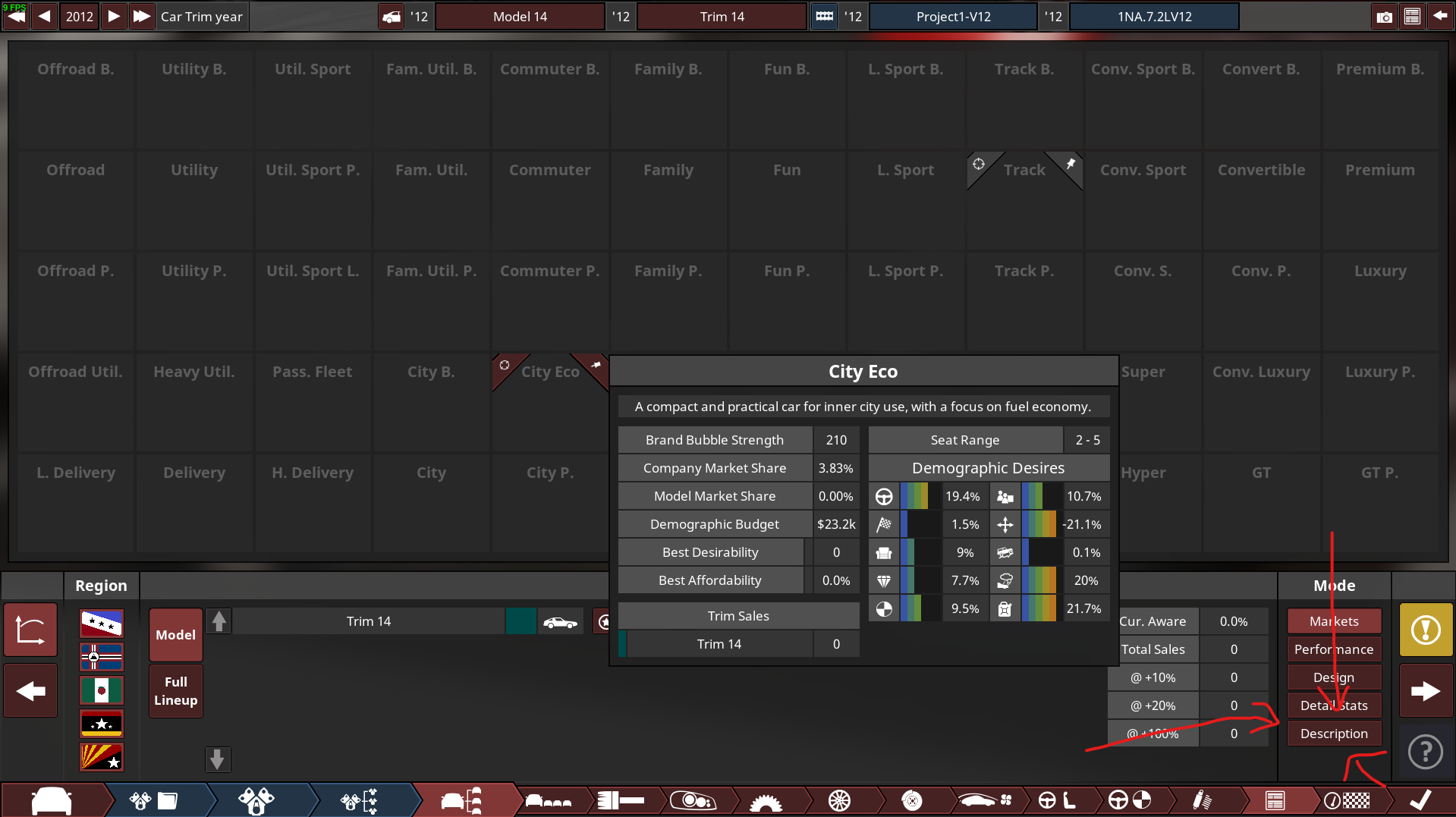
1. Go to the Statistic Tab
Go to the market tab (the tab before track testing) and press the Description button
2. Add what you want to add
~prop:[Fixture number],[Function],[Rotation X],[Rotation Y],[Rotation Z],[Translation X],[Translation Y],[Translation Z],[Min],[Max],[Offset],[Multiplier]~
~prop:0,steering,0,1,0,0,0,0,-900,900,0,1~
~prop:1,clutch,-20,0,0,0,0,0,0,240,0,1~
~prop:2,brake,-20,0,0,0,0,0,0,240,0,1~
~prop:3,throttle,-20,0,0,0,0,0,0,240,0,1~
~prop:4,rpm,0,-0.03,0,0,0,0,0,10000,0,1~
~prop:5,wheelspeed,0,-3.1,0,0,0,0,0,240,0,1~
~prop:6,oil,0,-1,0,0,0,0,0,180,0,1~
~prop:7,temp,0,-1,0,0,0,0,0,180,0,1~
~prop:8,fuel,0,-1,0,0,0,0,0,180,0,1~
~prop:9,parkingbrake,20,0,0,0,0,0,0,240,0,1~
~prop:10,steering,0,0,1,0,0,0,-100,100,0,1~
~prop:11,steering,0,0,1,0,0,0,-100,100,0,1~
~prop:12,airspeed,0.08,0,0,0,0,0,0,90,0,1~
"theres also code for boost gauges: ~prop:45,turboBoost,0,-4,0,0,0,0,-40,80,0,1~" -volvoguy

Use this for funny lights (pop-up)
\/\/\/\/\/\/\/

~prop:19,lights,24,0,0,0,0,0,0,65,0,1~
~prop:20,lights,20,0,0,0,0,0,0,65,0,1~

(Stole it from someone in the workshop)

3. Figure out what is the part number (Outdated)

Go to the Fixtures Tab and try to find the fixture number

Say you want to make the speedometer to work

You put 40 in the fixture number, export it, but it didn't work

~prop:40,wheelspeed,0,-2.2,0,0,0,0,0,122.222,0,1~

-----------Why?-----------

For some reason, a mirrored fixture counted as 2 fixture

(something like Headlights etc)

But in the UI it only counts as 1

Meaning if you're not prepared good luck counting from the start

Ended up on fixture number 58 here

(edit : you could delete and undo [Control+Z] to move the fixture to the bottom)


Just use the number
4. Rotation Calculation
"speedo needle is min 0 and max 50 m/s (~180 km/h) in this case. -5.6 in Y rotation is 280 deg / 50 m/s = 5.6 (negative because the needle was going the wrong way)

rpm needle is min 0 and max 7000 rpm in this case. 0.03 in Y rotation is 210 deg / 7000 rpm = 0.03"

Source : AtomicAL54 -

Shout out to An0nym0us in the comments

https://psteamcommunity.yuanyoumao.com/app/293760/discussions/2/3835423585508678543/?l=english

I'd recommend getting AutoBeam. It walks you through how to make all sorts of moving props for Beamng.

https://m.youtube.com/watch?v=c_fVPpet7Og&pp=ygUTQXV0b2JlYW0gZm9yIGJlYW1uZw%3D%3D
34 条留言
RY4NDY 12 月 5 日 上午 5:57 
There's also "rpmspin" to make a prop spin at the same speed as the engine (like a classic car's radiator fan that's directly attached to the engine's output shaft and thus spins with it), and "radiatorFanSpin" to make the prop start spinning whenever the engine temperature gets above 105 degrees Celcius (like a modern car's electronically operated radiator fan)
WolfyX18 11 月 25 日 上午 7:10 
@KeMu I did some experimenting and found that if I increased the X rotation number by about 30% (from 3.1 to 4) that seemed to fix it. No word yet on whether I managed to do a working temperature or fuel gauge, but it doesn't matter that much as long as I got my speedo and steering wheel. Thanks for your advice!
KeMu  [作者] 11 月 23 日 上午 11:03 
@WolfyX18
~prop:4,rpm,0,-0.03,0,0,0,0,0,10000,0,1~

Adjust this parameter (-0.03). Brute force if you're too lazy(like me lol) or read chapter 4
WolfyX18 11 月 23 日 上午 6:02 
Great guide, I managed to get a steering wheel to turn correctly but I then did the speedometer and it overreads by about 30%. How can I slow down the needle's rotation to be more accurate?
Umbra 9 月 30 日 上午 10:35 
hey. is there one for police lightbar's by chance? i really need it for a police car i built.
Beavis Gaming 9 月 6 日 上午 3:36 
where would i use the needle like for it to move?
Beavis Gaming 9 月 5 日 上午 10:38 
Thanks mate \/
Beavis Gaming 9 月 5 日 上午 5:55 
where would you find like the dials? for like the speed and that??
pointsmakeprizes 6 月 23 日 上午 2:38 
This is everything i have running in mine, obviously there not not all just going to work for you if copied because of differences in prop placement etc but it gives an idea of how it should lay out.
The gears are manual box listed,
N R 12345
The shifter prop for each gear should be placed as desired then flipped with the horizontal flip button 180 degrees from where they appear in beam except neutral which is saved in its normal state.