Titanfall® 2

Titanfall® 2

28 个评价
how to play Titanfall 2 on linux when all else fails
由 SamuraisEpic 制作
so this guide covers any troubleshooting steps you should take and provides a fix to the ea app being the ea app (an insufferable piece of garbage) and finally get the game working. this guide should work for other ea games as well, the last resort fix is universal.
   
奖励
收藏
已收藏
取消收藏
Intro
so in recent times, ea games have been increasingly painful to get working on linux, due to the god awful ea launcher. so here's a list of fixes i scoured the deepest corners of github for, along with a last resort for when all else fails. some of these are specific to Titanfall 2, others should work anywhere. i'll label them accordingly.
helpful game specific things
(game specific)
so for matchmaking some people on protondb as well as the github recommend adding this to your launch options as an environment variable if you don't find any games on intel.
OPENSSL_ia32cap=~0x20000000 %command%

next is getting rid of fullscreen as this can cause some issues like black screens when alt tabbing. this can just be done with the launch options
-window -noborder
in the steam launch options it would be something like
<ENV_VARS=here> %command% -window -noborder
this is not required when running via gamescope (make sure to replace <ENV_VARS=here> with any environment variables you use, some helpful ones i like are
PROTON_LOG=1
for "debugging", and
RADV_PERFTEST=rt
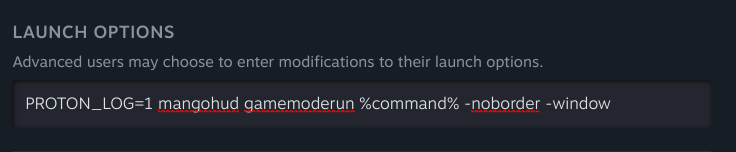
for AMD ray tracing in games that support it) you an also add mangohud and gamemode. here is a preview of what all those together looks like:
universal fix 1: modify environment variables sent to the ea app to be 1000 or less characters in length
so for some stupid reason the ea app has an aneurysm any time there is a large environment variable sent to it. add this to the launch options to fix it. what this little bash code basically does is go through the launch command and then limit any environment variable to 1000 characters so ea doesn't have an aneurysm. (note that this may break the intel matchmaking fix which relies on an environment variable)
for var in $(printenv | cut -d= -f1); do export $var=$(echo ${!var} | rev | cut -c1-1000 | rev); done ; %command% -window -noborder
(you'll wanna paste this entire text into launch options and make sure nothing else is there)
universal fix 2: the last resort, enable ipv6 if its turned off (read through the entire section)
right so you might be wondering "hey epic, why the h​ell would you have ipv6 off in $(currentyear)?" well, there is a long unresolved issue on steam for linux where download speeds can be cripplingly slow, and the 2 fixes for it are
  • a. to enable a local dns cache (like dnsmasq)
    and
  • b. disable ipv6 altogether.

    i wasn't satisfied with the results i got when only using dnsmasq, so i went ahead and disabled ipv6. turns out ea beefs with that. so your choice is to either

  • a. download games blazing fast
    or
  • b. play ea games and suffer excruciatingly low download speeds.

    it's unfortunate really, the fact ea even has to half a​ss bringing their games to steam is upsetting. but yeah.

    if you disabled ipv6 with grub, then simply remove
    ipv6.disable=1
    from your grub options and remake the grub config with
    sudo grub-mkconfig -o /boot/grub/grub.cfg
    and reboot, and if you used sysctl, then send
    sudo sysctl net.ipv6.conf.default.disable_ipv6=0 && sudo sysctl net.ipv6.conf.all.disable_ipv6=0 && sudo sysctl -p
    into a terminal, and that should be it (after a reboot of course).
Outro
well, thats it, this was my first guide and my first attempt at using gimp, took me 2 hours of lurking on github to find these fixes, so i hope it helped. drop any feedback and stuff in the comments, and remember,
$(current year) + 1
will always be the year of the linux desktop
18 条留言
Blaze 12 月 9 日 下午 1:58 
@sckart i knew somebody in here was gonna say it (I use arch btw)
Jeanne D'arksoul 12 月 9 日 下午 1:06 
thank you aviator for your input to the disscution and making me giggle
Anonymously_Anonymous 12 月 7 日 上午 12:34 
My solution was just, screw it i'll just get tiny10 on a seperate drive, I need windows for vr and other stuff anyway
DomDon 12 月 6 日 上午 11:49 
I had to do this guide to get it to work: https://forum.zorin.com/t/how-to-how-to-get-the-ea-app-working-into-steam/43016/2
By that I mean I had to download the EA launcher with steam
sckart 11 月 13 日 上午 7:41 
I use arch btw
Tamary 11 月 10 日 上午 4:32 
I'm on Kubuntu and when I launch TF|2 the EA app launches and tells me "failed to launch game". Does any of you have a solution for that please ?
BDSheep 10 月 26 日 下午 2:30 
my game says "ea failed installing" and doesnt let me play? how do i fix?
paulgeorgefan 8 月 24 日 下午 7:59 
@aviator why would anyone switch to w11 when its full of spyware and microsoft actively tries to stop you from removing said spyware
EGGONATOR. without 8 月 9 日 上午 7:33 
disabling the new ea overlay should also be here, that overlay appearing (like for a notification) freezes the game for me for a few seconds (some people crash apparently)
https://psteamcommunity.yuanyoumao.com/app/1237970/discussions/0/6690735268995260726/
pat1234 4 月 21 日 上午 10:49 
Actually helpful, now I just have to figure out how to run this game on a ♥♥♥♥♥ laptop (i5 8500 and hd 605 and 8gb ram)