Sid Meier's Civilization V

Sid Meier's Civilization V

74 个评价
COMMUNITY PATCH (VOX POPULI)
由 🔥 Svecka 🔥 制作
This guide will show you how to install Community patch (Vox Populi), that enhances and improves your Civ5 gameplay overall. Guide also features how to have Steam achievements enabled with mods together and how to play multiplayer with mods. And also how to get old launcher back :)
2
   
奖励
收藏
已收藏
取消收藏
INTRODUCTION
This guide will show you how to install community patch (Vox Populi), that fixes bugs, optimises the game, balances the civilisations and by your choose upgrade user interface and diplomacy and trade options. And also makes AI much much smarter and harder, especially in lategame.

You can also find out, how can you play game with mods enabled and still unlock Steam Achievements and how you can play multiplayer with mods.

And also how to disable buggy new launcher for Civilization 5 and have old launcher back :)
COMMUNITY PATCH
Even today, the community is still active and releases community patches for Civilization 5.
You can experience whole unofficial patch in nice installation package named VOX POPULI.

Just download the file and install it
(VOX POPULI automatic installer)[forums.civfanatics.com].

The installer will ask you what option would you like to install. I recommend Community Patch and Community Balance Overhaul Only as it only fixes core options (AI, bugs, balance overhaul).
If you want more advance experience, select Vox Populi (Including EUI), that installs also mods that are compatible and tested with community update (Enhanced User Interface, More Luxuries mod, diplomacy feature mod and more).

Don't forget to activate mods in Civilization 5 game. Go to MODS menu, then select mods you wish to enable, click NEXT, wait for mods to load and now the MOST IMPORTANT thing to do, DO NOT CLICK BACK, but select immediately single player on the same menu to start new game with mods enabled. If you select back, mods will be unloaded and you will play without them.

If you get texture error when starting the game, the problem is, that automatic Vox populi installer installs files as default into folder : "C:\Program Files (x86)\Steam\steamapps\common\Sid Meier's Civilization V\Assets\DLC ".
Move all files to your steam civ 5 DLC folder location.

STEAM ACHIEVEMENTS AND MODS
Whenever you enable mods trough MODS menu and play with them, Steam achievements will be automatically disabled. To enable achievements you have to trick the game, that you are not playing with mods. You can do this by packing mods into package called MODPACK and then this mods will load with Civilization 5 as DLCs.

If you downloaded Vox Populi existing MODPACKS from https://forums.civfanatics.com/threads/voxpopuli-modpacks-update-4-19-1.685164/ , then to enable Achievements, go to 16. and 17. point in below guide on how to enable Achievements.


You can find picture to picture guide on how to compile MODPACK here on STEAM WORKSHOP.


If you are little confused with picture guide above, you can also use my text guide below for help:

It is highly recommended, that you disable your antivirus for the time of this guide (creating modpack)


1. subscribe to Multiplayer Mods Workaround.

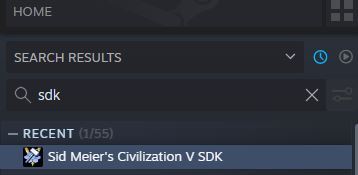
2. install Civilzation 5 SDK (search in your library by Sid Meier's Civilization 5 SDK and you will find it).

3. enable EnableFireTuner in config.ini file (go to file \Documents\My Games\Sid Meier's Civilization 5\config.ini ) and inside change from EnableTuner = 0 to EnableTuner = 1 and save file.

4. Launch Civilization 5 and enable windowed mode

5. load all mods that you want to play (don't forget to enable also Multiplayer Mods Workaround mod in mods menu)

6. start the game with mods (when you enter the game, you cannot do anything, that is on purpose)

If you get texture error when starting the game, the problem is, that automatic Vox populi installer installs files as default into folder : "C:\Program Files (x86)\Steam\steamapps\common\Sid Meier's Civilization V\Assets\DLC ".
Move all files to your steam civ 5 DLC folder location.


7. now go to Steam library, find and launch Sid Meier's Civilization V SDK

8. click on FIRETUNER

9. if everything is OK, there should be saying CONNECTED at the bottom left corner.

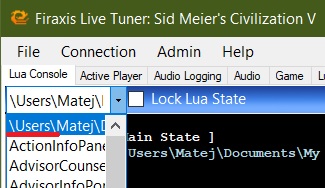
10. on top left corner you will see drop down menu LUA CONSOLE, click on it and from the drop downlist find MPMP STATE (it start with \users\...)


11. now type in the bottom row following command: " CreateMP() " and press ENTER.

12. Now it will compile files into MODPACK. When the program stops, you will see at the last line in the program the word: " DONE ".

13. You can now exit Civilization 5, then Firetuner.

14. The MODPACK is complete and it should be in your DLC folder of Civilization 5
( \Steam\steamapps\common\Sid Meier's Civilization V\Assets\DLC\). Folder is named MP_MODSPACK.

15. Search in folder MP_MODSPACK for InGame.lua file and delete it (Steam\steamapps\common\Sid Meier's Civilization V\Assets\DLC\MP_MODSPACK\Mods\Community Patch\Core Files\CoreLua\). IT will broke your game if you do not delete it.

16. Find "NewCustomModOptions.xml" file in folder "\Sid Meier's Civilization V\Assets\DLC\MP_MODSPACK\Mods\(1) Community Patch\Database Changes\.
Open the .xml file and find "API_ACHIEVEMENTS'". Set it value from 0 to 1.

17. Find "CIV5Units.xml" file in folder "\Sid Meier's Civilization V\Assets\DLC\Z_MODSPACK\Override"\.
Open the .xml file and find "API_ACHIEVEMENTS'". Set it value from 0 to 1.

18. Rename folder MP_MODSPACK to Z_MODSPACK, so it will load last in line after official Civilization 5 mods.

19. Now run Civilization 5 and start the game (DO NOT ENABLE MODS AND PLAY WITH MODS AS IT WILL CREATE ERRORS, beause mods will load as DLC on default at the start of the game).

Game will now run with MODS always as they load as game DLC. You don't need to go to MODS folder and enable mods. Achievements should work. You can also play multiplayer with mods now, but your multiplayer opponents must have exactly the same MODPACK folder that you have (you have to send them COPY of your MP_MODSPACK folder, and they should put it into their DLC folder).
MULTIPLAYER AND MODS
You can use above guide to play multiplayer with mods (all players must have same MODPACK) or you can download premade modpacks from community.


https://forums.civfanatics.com/threads/voxpopuli-modpacks-last-update-3-9.685164/
OLD LAUNCHER
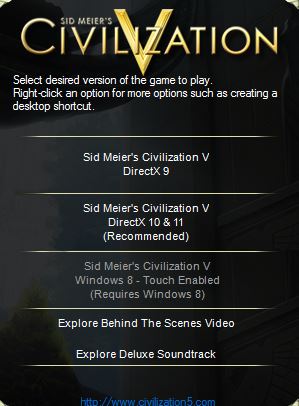
Firaxis implemented new buggy launcher for Civilization 5, that serve no other purpose than to promote fail of the game Civilization 6. You can get old launcher back by simple steps:

To enable old launcher:
1. in Steam library RIGHT CLICK on Civilization 5

2. then select PROPERTIES

3. select BETAS tab

4. enter beta acess code: " ineedlegacyaccess " and press check code

5. you will see new option unlocked called LEGACY

6. select from drop down list LEGACY option and wait for game to download update

7. Enjoy running your game with old launcher.

FINAL WORDS
Thx all community and modders who helped created all beautiful mods and made Civ5 awesome game. Also thx to authors of picture guide how to create MODPACK (cicero225,emeralis00) as i was before trying to create modpack trough visual basic and spend hours in vain and pain.

I made this tutorial to sum up all important things, that you need to know in playing enhanced Civ 5.
Any thumbs up, reward or subscribe for this guide are always welcome and appreciated.
38 条留言
Elon Mosque the Space Jihadi 10 月 1 日 下午 11:36 
the real civ 7
🔥 Svecka 🔥  [作者] 3 月 6 日 上午 11:59 
thx for update
nickvk. 3 月 6 日 上午 11:50 
However, adding too many mods will crash you on startup, so be warned
nickvk. 3 月 6 日 上午 11:49 
Hi, thanks so much for replying so soon.
Happy to say that I made it work.

To create your own modpack with ANY mods from Steam Workshop you have to do the following instead of step 16 in guide:
1. After creating a modpack and deleting 'InGame.lua', find 'NewCustomModOptions.xml' within 'Sid Meier's Civilization V\Assets\DLC\Z_MODSPACK\Mods\(1) Community Patch (v 141)\Database Changes'
2. Set 'API_ACHIEVEMENTS' to 1
3. Find 'CIV5Units.xml' within 'Sid Meier's Civilization V\Assets\DLC\Z_MODSPACK\Override'
4. Set 'API_ACHIEVEMENTS' to 1

Please, add this to the guide, as the following step 16 does not work.
I can't stress enough how much your guide has helped me and how thankful I am that you've made it. It is the only guide on the whole internet to explain how to play modded games with achievements on. Again, thank you.
🔥 Svecka 🔥  [作者] 3 月 6 日 上午 11:16 
🔥 Svecka 🔥  [作者] 3 月 6 日 上午 11:04 
hi. Over 1 year ago Vox Populi disabled Achievements. Vox Populi is now totaly changed.

You don't need to create mod pack anymore, dedicated fan is creating them for every new version of the Vox Populi. https://forums.civfanatics.com/threads/voxpopuli-modpacks-update-4-19-1.685164/
nickvk. 3 月 6 日 上午 11:01 
Can't do point 16 because there is no 'Achievements.xml' file anywhere within Documents or GameRoot directories. Is there anywhere else I need to look? This is literally the only thing that I can't do to get the achievements to work.
Czaritsa 2 月 24 日 上午 1:04 
Here are the 2025 instructions by 2k games to start Civ 5; now that they've removed the launcher entirely.

https://support.2k.com/hc/en-us/articles/34890889538707--Civilization-V-Launcher-Removal
🔥 Svecka 🔥  [作者] 2023 年 11 月 10 日 下午 11:11 
https://steamuserimages-a.akamaihd.net/ugc/38610708383892721/C9D7D76E06AA1F67C6ADB75CD0503EEA19C5193E/

There should be if you followed steps. I never experianced this problem myself.
happylabs 2023 年 11 月 9 日 下午 7:49 
I tried this today, for me there was nothing like "/Users/..../MPMP_STATE" in the Lua Console dropdown within Firetuner. Any ideas why that might happen?