Tom Clancy's The Division

Tom Clancy's The Division

Ikke nok vurderinger
Clean chat
Af Island Boy
Tired of the chinese spam in the chat? I have a solution.
   
Pris
Føj til foretrukne
Gjort til foretrukken
Fjern som foretrukken
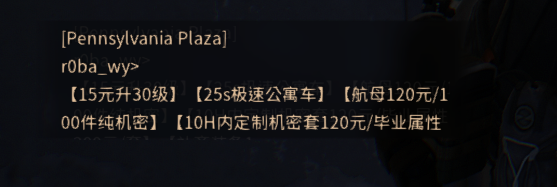
So there he is...

Spamming over and over and over again. Trying to sell his "services". We don't want that, right?

I offer you two methods of getting rid of him. You probably know the first method, but the second is the better option you might have not heard of.
The first (common and bad) method
I highly advise you NOT to use this method. Use the second (better) method, mentioned below. The first method is mentioned to help you avoiding a common mistake.

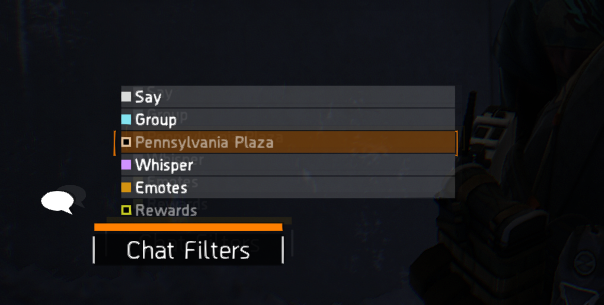
Open the chat, click on the button that mentions area chat (in my case it's Pennsylvania Plaza).
Now you don't see the spam but also normal people trying to write something in there. Not good...

Which brings us to the second, superior method.
The second (better) method
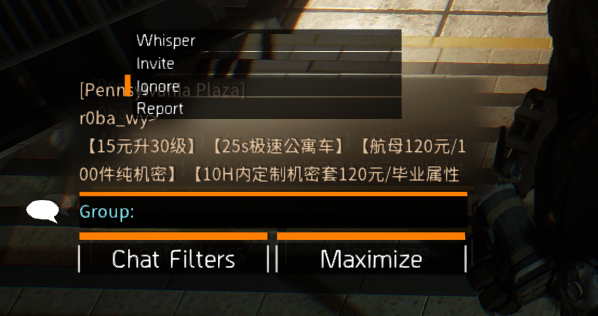
Open the chat menu. Scroll up or down and keep clicking the right mouse button on the top left corner of the chat window, until the popup will show.


Press "Ignore" and there you go. You have a clean chat, that can finally be used to talk to people. Yay!

You may have noticed that there also was a "Report" button. You can press that and report this "genius" for spamming ads. Might help others, perhaps?
That's it
I hope that I helped you!
4 kommentarer
Island Boy  [ophavsmand] 27. nov. kl. 12:25 
You need to click on their name for it to appear. It should be in the top left corner, but it might be a little tricky to catch due to the constant spamming.
Ananaga27 26. nov. kl. 11:17 
Idont understand how the second method works. No matter where I click, the menu doesent appear...
Agent AdaRedd 9. aug. kl. 13:28 
Big W
Hothead 28. juli kl. 2:11 
Huge