Insaniquarium! Deluxe

Insaniquarium! Deluxe

90 个评价
How to avoid carpal tunnel syndrome (AutoHotKey Auto-clicker script)
由 Massivive 制作
By running a small configurable script you can change your repetitive strain injury into a single long left-click!
4
2
   
奖励
收藏
已收藏
取消收藏
Introduction
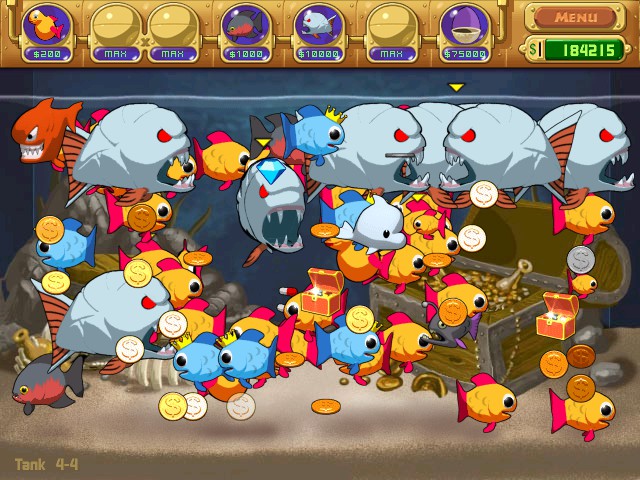
Completing the adventure mode for Insaniquarium can and will result in some extreme arm strain towards the end due to the excessive clicking that the game will demand of you.
You may reach a point where there are so many items on screen that you would need a vacuum cleaner rather than a mouse cursor to actually pick up any of them, a similar thing can be said for the later alien encounters which with their super inflated health would probably be better treated with the ghostbusters laser than with the puny single shot ray-gun that you have to hand, fortunately there's a solution for players who are determined to push back the alien menace!

With this guide, you could be comfortably managing tanks of this intensity and beyond!
The Software (AutoHotKey)
What is AHK?
AutoHotKey is a program for Windows (Not currently officially supported on Mac or Linux, unfortunately) that allows users to write and run scripts for automating basic to advanced user actions by using the program's own simple scripting language, these scripts can be written and modified by the user with any text editor like Windows' own Notepad

Why AHK?
While there are a number of tools online that can be downloaded which provide you with the needed functionality, I have elected to use this software as it is safe and secure, and scripts written in it can be very easily modified to meet your needs.

Where do I get it?
At the time of my writing (26/07/2020) the program can be downloaded from its official website which can be found at this link[www.autohotkey.com]
The program is free and most of the information that you would need to know about it can be found either on the website or by browsing Reddit or the AutoHotKey forums
The Script and how to use it
When looking for a good auto-clicking script I was sure to remember a golden rule of all programming: Don't bother trying to re-invent the wheel.

The internet is a big place, and in most cases if you need to do something, someone else has already asked about it online, and some other helpful person was able to answer them. This case was no exception to the rule, and I was able to find a short Reddit exchange in which some users laid out their favourite auto clicking scripts for AHK

Full credit to Reddit user /u/Ravioles for the following little script

The actual code:
~$*LButton:: While (GetKeyState("Lbutton", "P") and GetKeyState("F8", "T")){ Click Sleep 50 } return
What it does:
While this script is running, it will wait until it receives an input of Lbutton, which is your left click. At the same time the program will be awaiting an input of the F8 key as a toggle of "on" or "off" for the autoclick. If F8 has been pressed to turn the script on, pressing and holding left click will cause the program to send a "click" signal every 50 milliseconds.

The beauty of this is that you can change it if you like, feel free to edit the mention of "F8" to some other key, modify the number after "Sleep" to control the interval at which the script attempts to send a click, etc.

Yeah but how do I turn these words into actions
Assuming that you have installed AutoHotKey from the site (see above section):
Simply highlight and copy the code above, open up a text editor (Notepad works fine!) and paste the code in.
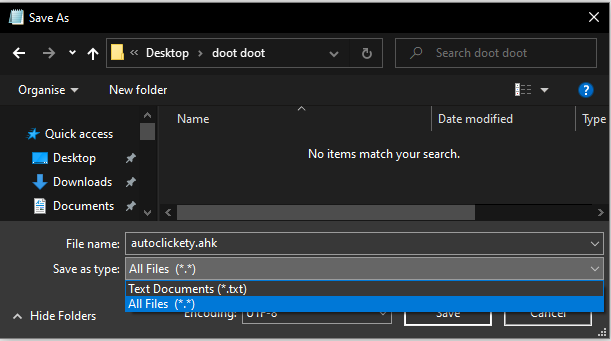
Now go to "file" > "save as"
When given the option to save the file, change the file type to "All files", select a save location, and then give the file a name, adding .ahk to the end of it.
click Save


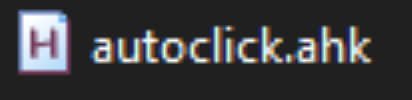
Once you have saved this file it should appear in the location you selected, if you have AHK installed you will immediately notice that the file now has an icon to indicate that it is a valid script
Simply double click this file to run it, if there are no errors then you have probably done it right!
To end the script you just need to go to the system tray in the lower right corner of your screen, right click on the AHK icon, and close it.
The End
If all has gone well then you should be able to simply hold down left click when you next play Insaniquarium and you will begin to drop food, pick up treasures, and shoot your gun at rapid speed!
Feel free to mess around with the script to your liking, but be warned that there is capacity to mess things up, so if you really aren't sure then it may be best not to change too much.
You can also look online for either other scripts people have made or for instructions on how you can write your own, feel free to share in the comments if you figure yourself to be a bit of a scripting wizard!

Thank you for reading my guide, hopefully this will save you from some potential arm pains, this kind of muscular strain is something to take seriously, people have needed surgery to correct it in some serious cases, so keep your arms healthy if you want to keep gaming into your elderly years.
19 条留言
Massivive  [作者] 11 月 22 日 上午 4:38 
@Roan Rahl
Respectable
Roan Rahl 11 月 20 日 下午 4:28 
Pfft no thank you - i like my nostalgia pure - pains and all!
revel10 2024 年 10 月 10 日 下午 5:40 
hi for those of you ACTUALLY looking for an alternative there's a program called op auto clicker lol it lets you change the amount of time between clicks down to the milliseconds, it lets you specify a screen position, it lets you introduce randomness between clicks (for those of you wanting to use it for a game or something that detects autoclickers) etc it's very nice
capatainfatass68 2023 年 6 月 25 日 上午 10:23 
just get good
nara 2023 年 3 月 28 日 上午 10:16 
actually, you can click and hold to spawn pellets
ʍʀ.ɮɛʋɛʀʟʏ 2022 年 6 月 5 日 上午 7:47 
Hi all, For anyone looking for an alternative check out my simple AutoIt (NOT AutoHotKey) script which provides a toggleable autoclick with two speed options :) It's pretty self-documenting, so feel free to change the Hotkeys or the speed toggles. I have it set to click either every 50 or 10ms but you can adjust to your taste. I hope this makes the later stages a little more pleasant for somebody!

HotKeySet("{ESCAPE}","stop")
HotKeySet("{`}","toggle")
HotKeySet("{1}","toggleSpeed")

$isOn = 0
$speed = 50

Func toggle()
If $isOn Then
$isOn = 0
Else
$isOn = 1
EndIf
EndFunc

Func toggleSpeed()
If $speed = 50 Then
$speed = 10
Else
$speed = 50
EndIf
EndFunc

Func stop()
Exit
EndFunc

While 1
If $isOn Then
MouseClick("left")
sleep($speed)
EndIf
WEnd
Crocalu 2022 年 5 月 27 日 上午 4:16 
Thanks, that's exactly what I was looking for, I will try that out and fiddle a bit to customise it.

For anyone else checking out this guide and seeing my comments, I'll say that it does work exactly as the author described! Just takes a second to understand.
I'm just a bit of a dunce in understanding this kind of stuff, but my fingers are very grateful.
I might make 2 scripts, one for giving the fish food slowly in the early game and one for blasting the aliens and feeding tons of fish at once =D
Massivive  [作者] 2022 年 5 月 26 日 上午 8:08 
Hi Crocalu,

The intended effect is for the repeated click to only be sent when the mouse button is held down, otherwise it would be on all of the time which could cause problems
if you would like it to be always-on you can shorten the script to

~$*LButton::
While (GetKeyState("F8", "T")){
Click
Sleep 50
}
return

in this example pressing F8 and then clicking once will cause the click signal to send repeatedly until you press F8 to toggle the effect off again

Let me know if this works in a way that is more convenient for you!
Crocalu 2022 年 5 月 26 日 上午 7:01 
It only works if I keep the mouse button pressed down
Crocalu 2022 年 5 月 26 日 上午 6:59 
all it does is it makes everything a doubleclick. Any1 know a fix? :(