Team Fortress 2

Team Fortress 2

170 个评价
How to activate console in Team Fortress 2
由 Avaray 制作
By default console is disabled, so You can't open it. This short tutorial will show You two easy ways to activate console.
   
奖励
收藏
已收藏
取消收藏
What is a console?
The console is a command-line interface for the advanced configuration of games.
How to activate console in game?
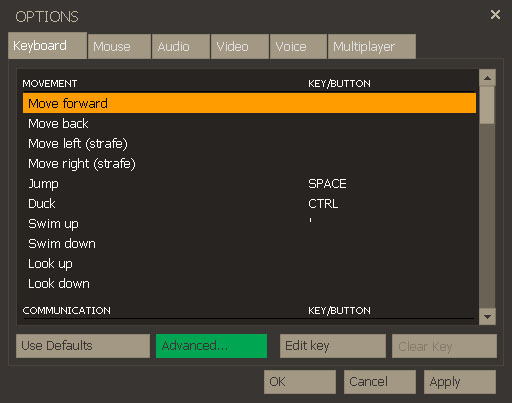
To enable console in game You need to enter into game options.
Then in "Keyboard" tab press "Advanced" button.


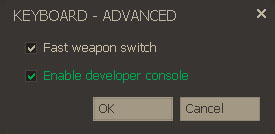
Small window will pop-up.
There are two options. Check the second option and press OK.


Above steps are showing way to activate console in game Team Fortress 2.
In other Valve productions (like Half-Life or Counter-Strike) console activation method is the same and that option is mostly in same place - in keyboard advanced options.
How to activate console in Steam game library?
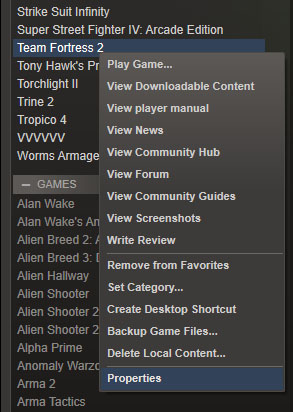
Open Your game library in Steam.
Find Team Fortress 2, press right mouse button on it and choose "Properties".


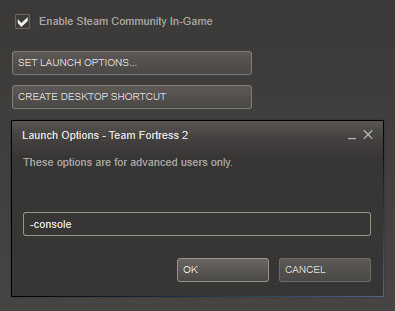
Then click "Set launch options" button and small window will appear.
Put -console launch option in that window and press OK.
How to use console?
To open console You need to press ~ key on Your keyboard.
With tabulator key You can see hints to commands.
To separate many commands in one line use semicolon.
To send commands just press Enter.
87 条留言
Sheepless Ram 2023 年 4 月 29 日 上午 9:45 
@Jezus Just rebind it to a different key. I had that too because if you don't have a keyboard layout with "~" on that key, it always doesn't work.
Jesus The christ 2023 年 4 月 26 日 下午 12:20 
i litteraly cant press that key bc it does NOTHING
swervy 2022 年 5 月 22 日 上午 6:14 
i don't have the old version and i can't change it help pls
Avaray  [作者] 2022 年 1 月 4 日 下午 3:09 
bind o toggleconsole
holden caulfield 2021 年 12 月 27 日 上午 10:08 
With witch command do I bind the console to 0?
Dorkix 2021 年 2 月 17 日 上午 11:18 
Chads bind the console to the ENTER key
Avaray  [作者] 2020 年 10 月 4 日 下午 3:05 
If you Really dont have it, then you can switch keyboard layout in OS for different one. Or write a macro for that symbol. With AHK for example.
Shizan 2020 年 10 月 3 日 上午 9:13 
i dont have a ~ key cause german keyboards
Gorbattente 2020 年 9 月 2 日 上午 6:26 
i dont have the ~ on the keyboard
Raiden_Shogun 2019 年 10 月 2 日 上午 3:28 
how do you know if it worked or not?