Broken Sword 1 - Shadow of the Templars: Director's Cut (2009)

Broken Sword 1 - Shadow of the Templars: Director's Cut (2009)

评价数不足
Broken Sword 1 Original "Full widescreen fix"
由 Lars 制作
Step 1: Download ScummVM. "Though you probably are gonna be prompted with update when downloading Broken Sword 1 original game.

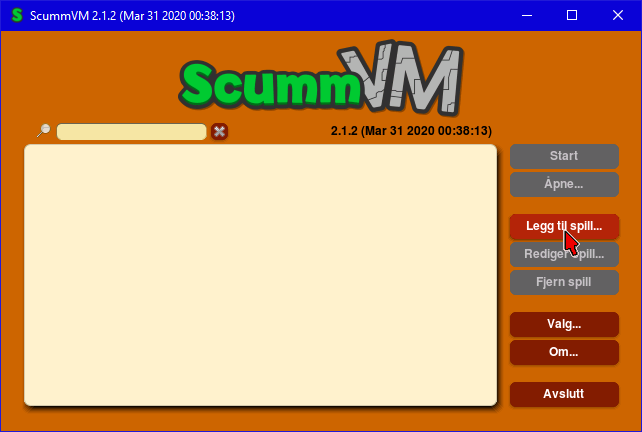
Step 2: Open ScummVM
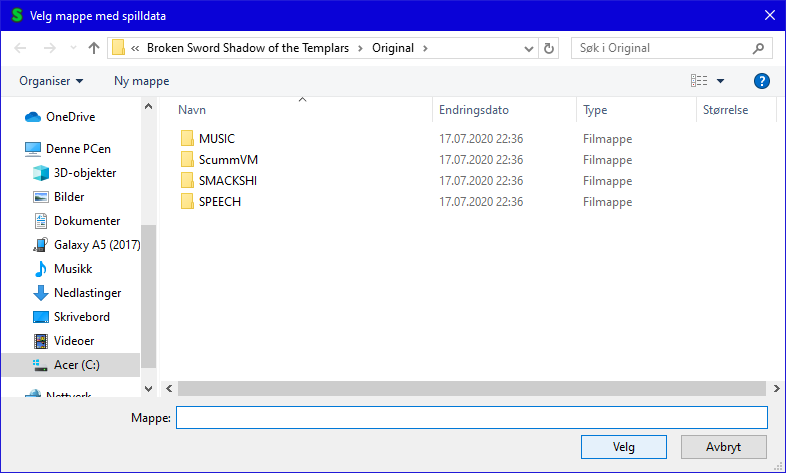
Click "Add Game" then go to this direction
C:\Program Files (x86)\Steam\steamapps\common\Broken Sword Shadow of the Templars\Original
Click "Ok"

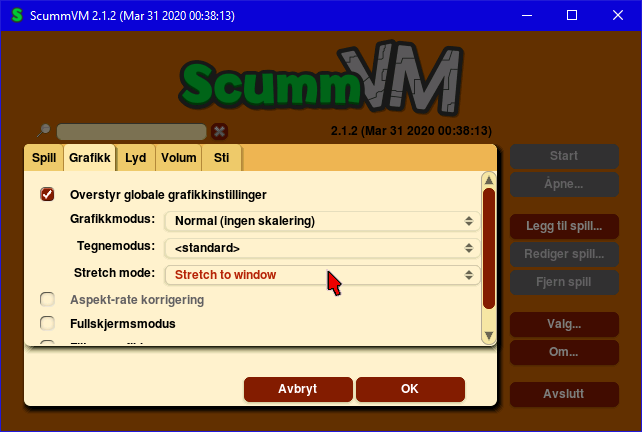
Step 3: Then go to Graphics tab "override graphics option" then on stretch mode, pick "Stretch to window" then click OK.

Step 4: Start the game and you're good to go. You can also enter fullscreen and out of it by pressing "Alt + Enter" at same time. Or you can manually change window size.

Step 5: Have fun with the game!
   
奖励
收藏
已收藏
取消收藏
Tutorial Images


10 条留言
Ava 2023 年 12 月 1 日 下午 2:35 
You can also change the graphics module to OpenGL and the picture will also be fullscreen
Ava 2023 年 12 月 1 日 上午 5:48 
Можно еще поменять графический модуль на OpenGL и картинка будет также на весь экран
Mooncalf 2022 年 1 月 13 日 上午 10:55 
Yes this fills the screen. It also messes up the aspect ratio.
_oFca 2020 年 12 月 24 日 上午 2:37 
thank you.
Original Broken Sword is the real broken sword....
härjaren 2020 年 10 月 6 日 上午 4:34 
cool
Lars  [作者] 2020 年 7 月 19 日 上午 4:21 
Also. Apparently this also works for Broken Sword 2 Original too.
Links to it if you cant find it. The only difference is. Its gonna say "broken sword 2" to the file direction

But nice that you get the option to play remaster or original.


Broken Sword 1 Original
https://psteamproxy.yuanyoumao.com/app/580430/Broken_Sword_1_Original_Version/

Broken Sword 2 Original https://psteamproxy.yuanyoumao.com/app/580440/Broken_Sword_2_Original_Version/
Lars  [作者] 2020 年 7 月 19 日 上午 4:14 
No problem. Glad to help!
allanlewis 2020 年 7 月 19 日 上午 4:06 
Thanks, Lars!
Lars  [作者] 2020 年 7 月 19 日 上午 3:47 
This doesnt include the "Director's cut version" But you can go in the game and change resolution settings. I tend to pick "Augmented". The screen is big enough and i dont mind that.
Maybe there is a way to "Scale it" in graphic cards options. But i dont know.

Atleast this helps for the fans of the original version!
allanlewis 2020 年 7 月 19 日 上午 3:41 
This doesn't appear to work with the "Director's Cut" version - do I need the original version?