Steam
102 个评价
How write review on Appid 753 (Steam app)
由 󠀡 和其他 1 人合作完成
Tested on Google Chrome and Mozilla Firefox.

*Guide updated: Working as of November 2022.*
   
奖励
收藏
已收藏
取消收藏
Post review.
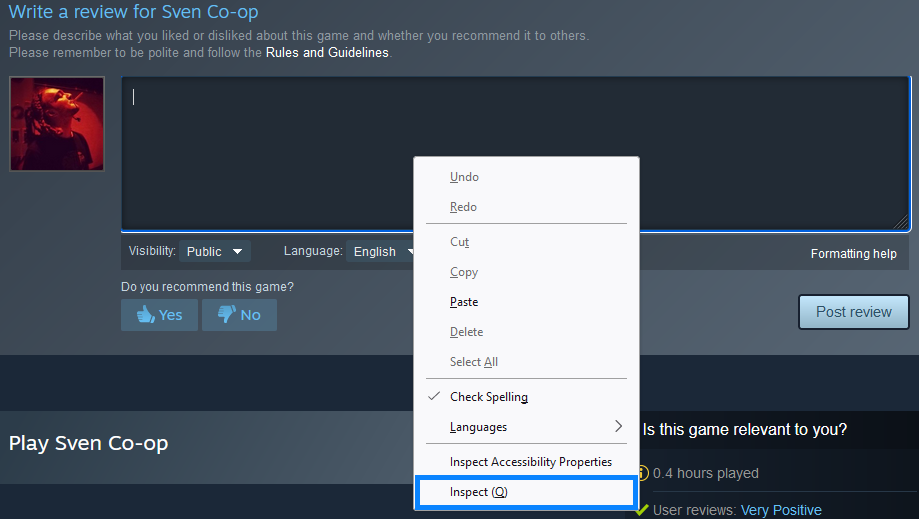
1.) Go to ANY game store page. Right click on page. Click "Inspect".


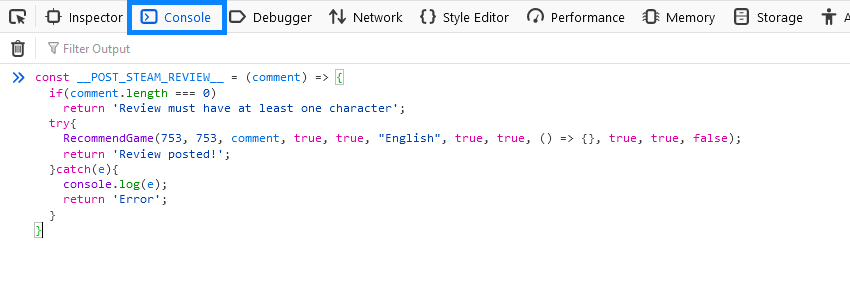
2.) Go to console. Enter following:
const __POST_STEAM_REVIEW__ = (comment) => { if(comment.length === 0) return 'Review must have at least one character'; try{ RecommendGame(753, 753, comment, true, true, "English", true, true, () => {}, true, true, false); return 'Review posted!'; }catch(e){ console.log(e); return 'Error'; } }


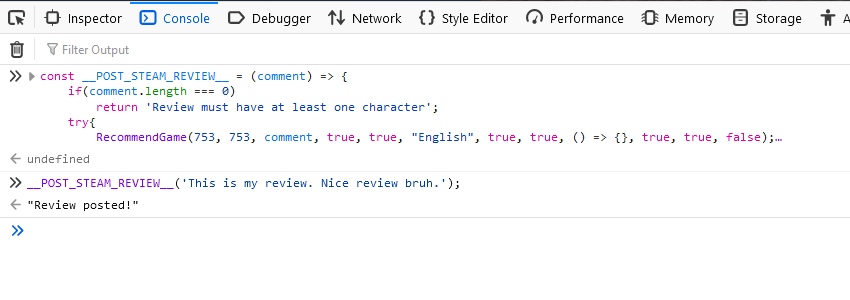
3.) Call __POST_STEAM_REVIEW__ in console with your comment.
example:
__POST_STEAM_REVIEW__('This is my review. Nice review bruh.');


Review posted! Check sections below if you want to learn more.

Additional customization.
If you want to rate down review, set fourth argument from to false.
RecommendGame(753, 753, comment, false, true, "English", true, true, () => {}, true, true, false);

If you want to change review to private, set fifth argument to false.
RecommendGame(753, 753, comment, true, false, "English", true, true, () => {}, true, true, false);

If you want to disable comments on review, set last argument to true.
RecommendGame(753, 753, comment, true, true, "English", true, true, () => {}, true, true, true);
Docs: RecommendGame function declaration.
function RecommendGame( appid, steamworksappid, comment, rated_up, is_public, language, received_compensation, divBtn, onSuccessFunc, divToShowError, navref, bDisableComments ) { $JFromIDOrElement(divBtn).hide(); var url = 'https://psteamproxy.yuanyoumao.com/friends/recommendgame'; if ( navref ) MakeNavCookie( navref, url ); var params = { appid: appid, steamworksappid: steamworksappid, comment: comment, rated_up: rated_up, is_public: is_public, language: language, received_compensation: received_compensation, disable_comments: bDisableComments, sessionid: g_sessionID }; $J.post( url, params ) .done( function( data ) { if ( data && data.success ) { $JFromIDOrElement(divToShowError).hide(); onSuccessFunc(); } else { $JFromIDOrElement(divBtn).show(); var $Error = $JFromIDOrElement(divToShowError); if ( data && data.strError ) { if ( !$Error.data( 'strOrigMessage' ) ) $Error.data( 'strOrigMessage', $Error.html() ); $Error.html( data.strError ); } else if ( $Error.data( 'strOrigMessage' ) ) $Error.html( $Error.data( 'strOrigMessage' ) ); $Error.show(); } } ); }
Steam tracking hours.
36 条留言
GoldenEldiablo 12 月 7 日 下午 2:57 
Still works perfectly fine
Zeugziumy 10 月 28 日 下午 8:07 
You could write the review on a Notepad first (maximum 8000 characters), put anything on the "This is my review. Nice review bruh." area, then going to your Steam profile, head to Reviews, click on the "Recommended" or "Not Recommended" part of the review, click Edit Review, and paste from there.

I imagine that links and break lines might be more difficult to rely via browser console commands, so that's what I did when writing a review for a Demo that isn't available for reviewing. It also seems that it's no longer possible to mark Reviews as Private? There's only Public and Friends Only now.

I also did not test, but I'd assume that if you change game's AppID with the "const" command, then you could just write on the review box of the game you used as a "base" on the store page? Or is that not possible?
RETRO 5 月 12 日 下午 1:33 
strError "There was a problem posting your review."
🚬󠁳Татунхафог 2024 年 9 月 26 日 上午 7:26 
works :rjumendoka2:
+rep
gumball 2023 年 8 月 25 日 下午 1:06 
yall trippin dis still works
󠀡󠀡 2023 年 7 月 24 日 下午 10:02 
Does not work
Holar 2023 年 7 月 11 日 下午 2:47 
no longer works with the new design of course :(
dead cow⁧⁧♥♥♥♥♥♥  [作者] 2023 年 6 月 28 日 上午 12:40 
@LISS Refresh browser and try again.

If anyone got questions i'll be glad to help, just add me :happy_yeti:
LiSS 2023 年 6 月 27 日 上午 1:20 
Uncaught SyntaxError: redeclaration of const __POST_STEAM_REVIEW__

got an error.
dead cow⁧⁧♥♥♥♥♥♥  [作者] 2023 年 3 月 1 日 上午 3:48 
Do you have at least 2 hours of played time on Steam App?