



安装 Steam
登录
|
语言
繁體中文(繁体中文)
日本語(日语)
한국어(韩语)
ไทย(泰语)
български(保加利亚语)
Čeština(捷克语)
Dansk(丹麦语)
Deutsch(德语)
English(英语)
Español-España(西班牙语 - 西班牙)
Español - Latinoamérica(西班牙语 - 拉丁美洲)
Ελληνικά(希腊语)
Français(法语)
Italiano(意大利语)
Bahasa Indonesia(印度尼西亚语)
Magyar(匈牙利语)
Nederlands(荷兰语)
Norsk(挪威语)
Polski(波兰语)
Português(葡萄牙语 - 葡萄牙)
Português-Brasil(葡萄牙语 - 巴西)
Română(罗马尼亚语)
Русский(俄语)
Suomi(芬兰语)
Svenska(瑞典语)
Türkçe(土耳其语)
Tiếng Việt(越南语)
Українська(乌克兰语)
报告翻译问题



















 奖励
奖励




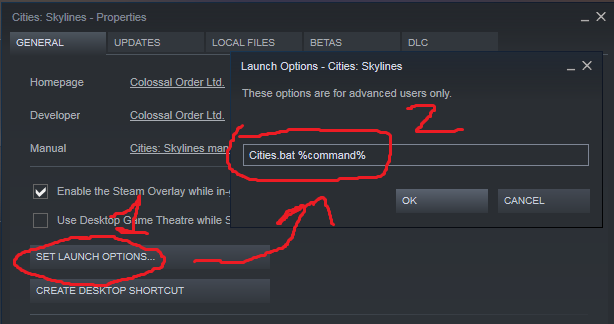


I tried the command way but I keep getting errors, can someone please help me with that? I'm sorry but I need a detailed vesrion about the command thing, like why do I need to put ''cd' in command when it doesn'st do anything? I need a video or something because I can't find it anywhere.
Also the Not Launcher Option doesn't work either for me. The game won't start without the bat command, with or without launcher. All I want is the overlay back and I tried everything...
Click on the gear icon on the game's page & Click Properties
[Installed Files] Click Browse.
Copy the entire path "... steamapps/common/Cities_Skylines"
Back in Properties, Click [General]
In Launch Options paste the entire folder path you just copied in the box
After .../common/Cities_Skylines add "/Cities.x64 %command%"
That's all that's required.
Long time since I've played and I was confused as to why the game suddenly required a launcher.
I'm so sick and tired of every ♥♥♥♥♥♥♥♥ company pulling ♥♥♥♥ like this. Launchers are just resource hogs and their only real purpose is to steal private data to sell to third parties which is utter ♥♥♥♥♥♥♥♥.