Devil May Cry 5

Devil May Cry 5

76 个评价
How To: FIX DMC 5 DIRECTX 11 CRASH. - NVIDIA GPU.
由 Spefix 制作
Fixing the crashing issues in DMC 5 running on DirectX 11 Mode.
   
奖励
收藏
已收藏
取消收藏
How to fix DirectX 11 crashes and improve your performance?:
Starting off with a configuration file.


As you know, by changing the DirectX version from 12 to 11, in DMC 5 PC version you can fix your stuttering and lag during cutscenes and improve the overall performance.
To do that, you need to go to your Devil May Cry 5 files, open dmc5config.ini file and change Capability, TargetPlatform lines to DirectX11 and for performance and censorship removal set DepthOfFiledEnable line to false and LensFlareEnable to false (Credits to MechaDeka steam guide).

Fixing the crash by downgrading/upgrading your GPU drivers.


Some of you, including me were having troubles with game crashes and freezes after doing this. To fix that, you need to download Nvidia GeForce 388.00 WHQL driver[www.guru3d.com].

Also, open your steam library, right click on Devil May Cry 5, select Properties and press Launch Options..., there you want to input -high line and press OK.

In Game options, disable V-Sync and set your refresh rate to the highest possible.

I'm going to be waiting for your feedback.
Cheers!
Performance Comparison video by me.
Another method to fix DirectX11 Crashes for Nvidia GPU's.
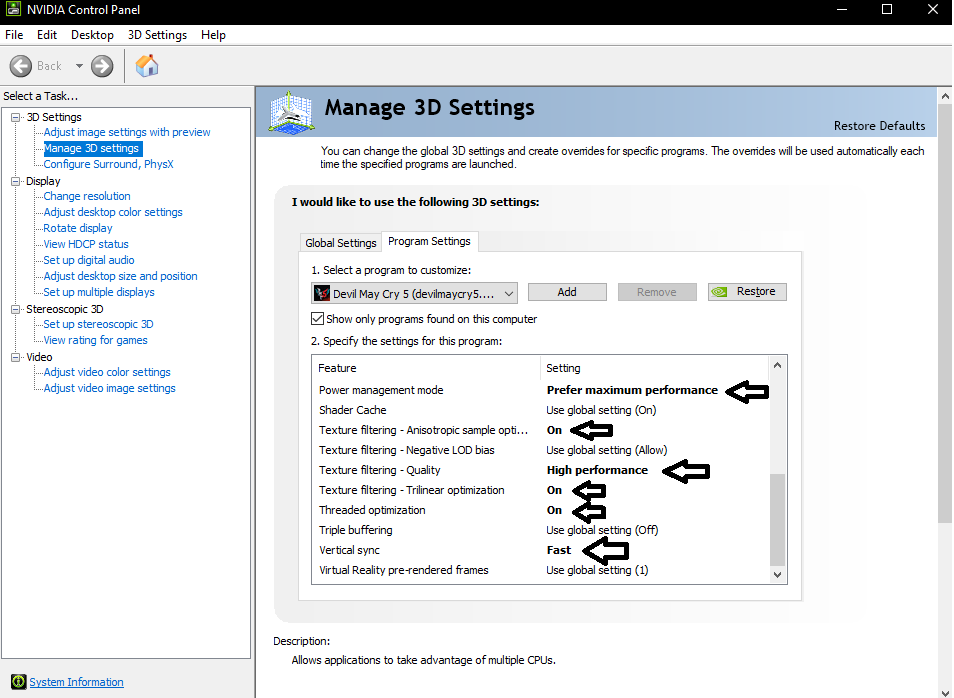
First, right click on your desktop and open Nvidia Control Panel.
Then navigate to "Manage 3D Settings" tab on your left. Choose "Program Settings" tab and add DevilMayCry5.exe there. In the Specify the settings for this program window, scroll down to the very end and change the following settings as showed in the photo:
For 0x8007000e code crashes:
Lower your graphics in settings menu and try downgrading/upgrading to Nvidia 391.01 Drivers.
21 条留言
Mayweather 6 月 5 日 下午 4:26 
Crashes with dx11 and with dx12, I've already tried everything, nothing helps
kaku yummies 2024 年 1 月 31 日 上午 6:08 
It doesn't work on my RX550, driver version "23.11.1"
Whenever I put it on DX11, it just won't open the game at all
Maybe it's because of my crappy G3250 intel CPU that I have to DESPERATELY switch, but anywho i wonder if I have to downgrade the drivers to make do
saint_mungo69 2022 年 6 月 10 日 下午 12:55 
Spefix, I've found disabling the 'optimized shader' solves alot of the crashing in the config. For safety I also disabled the API fallback as well as adding -dx11 to the DMC5 launch options...

Here's the render section of the config with the changes:
[Render]
PCTargetAPIFallback=Disable
Capability=DirectX11
TargetPlatform=DirectX11
UseOptimizeShader=Disable
LastCrashReport=
UseVendorExtention=Enable

I'm using AMD and DMC5 is nVidia optimised so maybe the optimised shader is for nVidia rather than AMD? I'm onnly saying that because my setup is full AMD and it couldnt make it past the first loading screen without crashing to desktop with the optimised shader enabled
Spefix  [作者] 2021 年 2 月 10 日 下午 12:35 
Vergil DLC has some badly ported cutscenes and details to it. I recommend lowering the graphics settings and downgrading DirectX from 12 to 11 in the .ini file.
xWhirr 2021 年 1 月 10 日 下午 4:38 
Same here. Crash and freezing all the time now after Vergil DLC.
Questionmarkx2 2021 年 1 月 10 日 上午 6:27 
I never had any issues running on dx11 until vergil DLC. Now it mostly crashes when a new stage is loaded. Never on startup though. Any ideas?
YXNG SHARK 2020 年 12 月 18 日 下午 2:30 
Awesome Thank You. I did everything but had to update my NVIDIA Geforce Driver from the 388.0 in addition to the advice wit the to not let allow to read or run in the properties of dmc5config.ini I also made it read-only so it wont change itself everytime I tried to run it. Now Im perfectly Setup! :)
Psychodelic Lion 2019 年 6 月 4 日 下午 5:07 
On dmc5config.ini file DepthOfFiled is not spelled right. I spelled it properly as Field with no differance in gameplay. If you False value it, perhaps there is no differance. Im using Intel onboared 4400 wich isnt supposed to play this, it plays Witcher3 and divine divinity fine. I am having same problems as everybody. Gameplay is vastly improved stepping from D12 to 11.. I changed antialising to 16x for big improvement in look. Unfortunately DirectX11 crashes but less often than 12. And the game looks better for me in 16x. I'm going to roll back my video drivers from the most recent ones offered by microsoft. see if it helps.

My question is: there have been two patches for this game according to Capcon; 1.07 which has bloody palace mode; and 1.08 which is supposed to fix these problems; why cant Steam offer these downloads? If they are included with Steam why doesn't 1.08 fix the problem?

Why isn't there any update links here?
Steve 2019 年 5 月 9 日 上午 9:51 
i did what you said and it crashes even more now. help?
TrialMacameau 2019 年 5 月 2 日 下午 6:29 
Nvidia Driver 388.00 Saved my Bacon I didn't experience any crash with that version passed mission 2