Blender
评价数不足
How to use an older Blender version on Steam(Downgrade) [EN/PTBR]
由 João Bennington ® 和其他 1 人合作完成
A quick guide for those who want to use an older version of Blender, and especially those who are having problems with Open gl error 2.1 or even with the new version 2.8, which requires Open gl 3.3.

Um guia rápido para quem deseja usar uma versão mais antiga do Blender, e principalmente, para quem está tendo problemas com Open gl error 2.1 ou ate mesmo com a nova versão 2.8, que requer Open gl 3.3.

   
奖励
收藏
已收藏
取消收藏
Getting Started | Começando
Required Items:
Download
Steam version of Blender installed
An earlier version of your own
here [download.blender.org]
A file decompressor
Winrar [www.win-rar.com]

* Download the file in .zip format. If you already have an older version of it, ignore this item.

Ps²: Shortcuts we used in this guide:
• CTRL + A (Select all the files)

Itens necessários:
Download
Versão Steam do Blender instalada
Uma versão anterior de sua preferência
aqui [download.blender.org]
Um descompactador de arquivos
Winrar [www.win-rar.com]

Baixe o arquivo em formato .zip. Se você já tem uma versão mais antiga, ignore esse item.

Ps²: Atalhos que usamos nesse guia:
•CTRL + A (Seleciona todos os arquivos)
Get to work | Mãos à obra
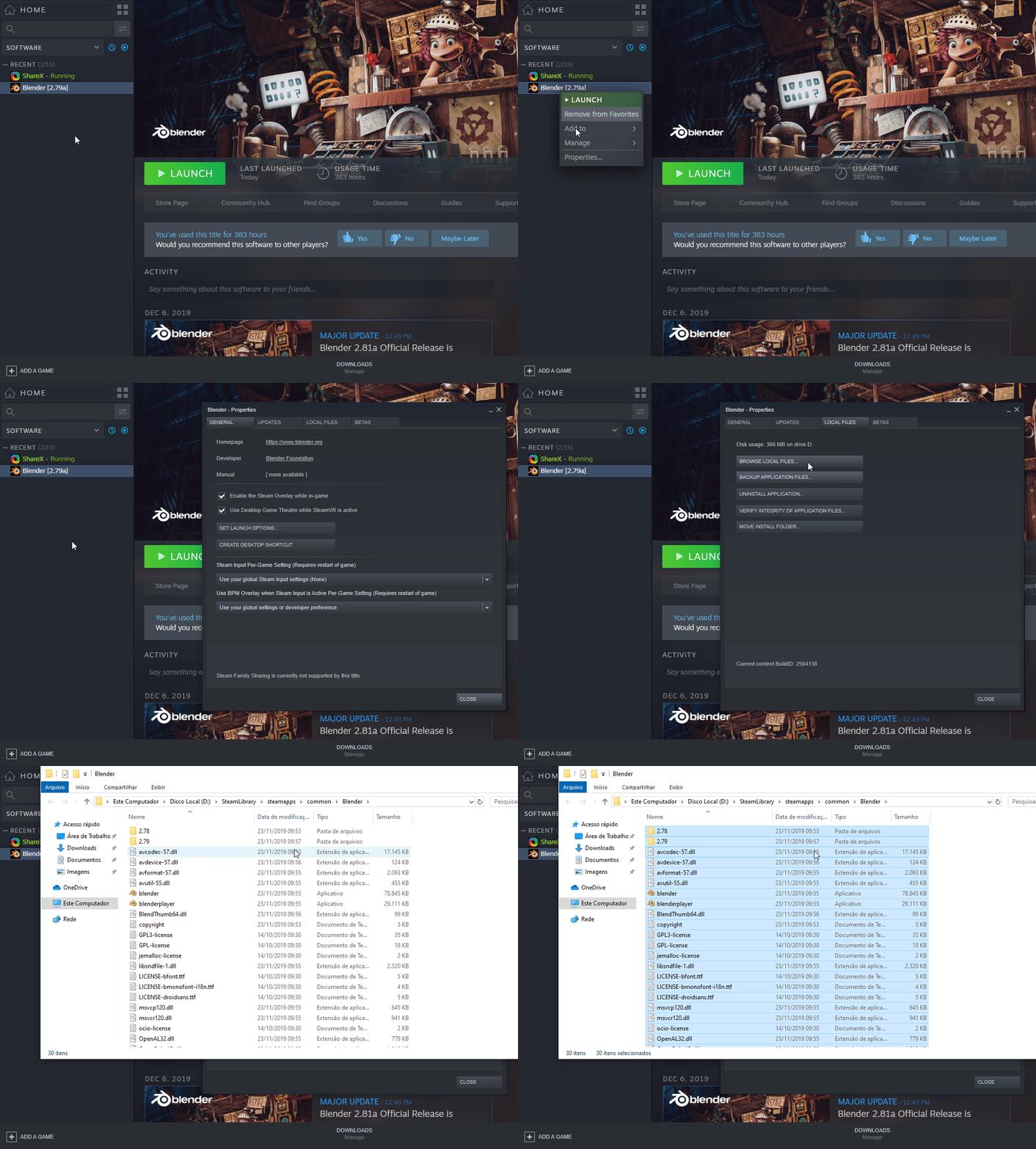
1 → First, go to Blender's steam version directory and delete all existing files there
Primeiro, vá para o diretório da versão Steam do Blender e exclua todos os arquivos existentes lá

Like This:
.
.
.
Replacing | Substituindo
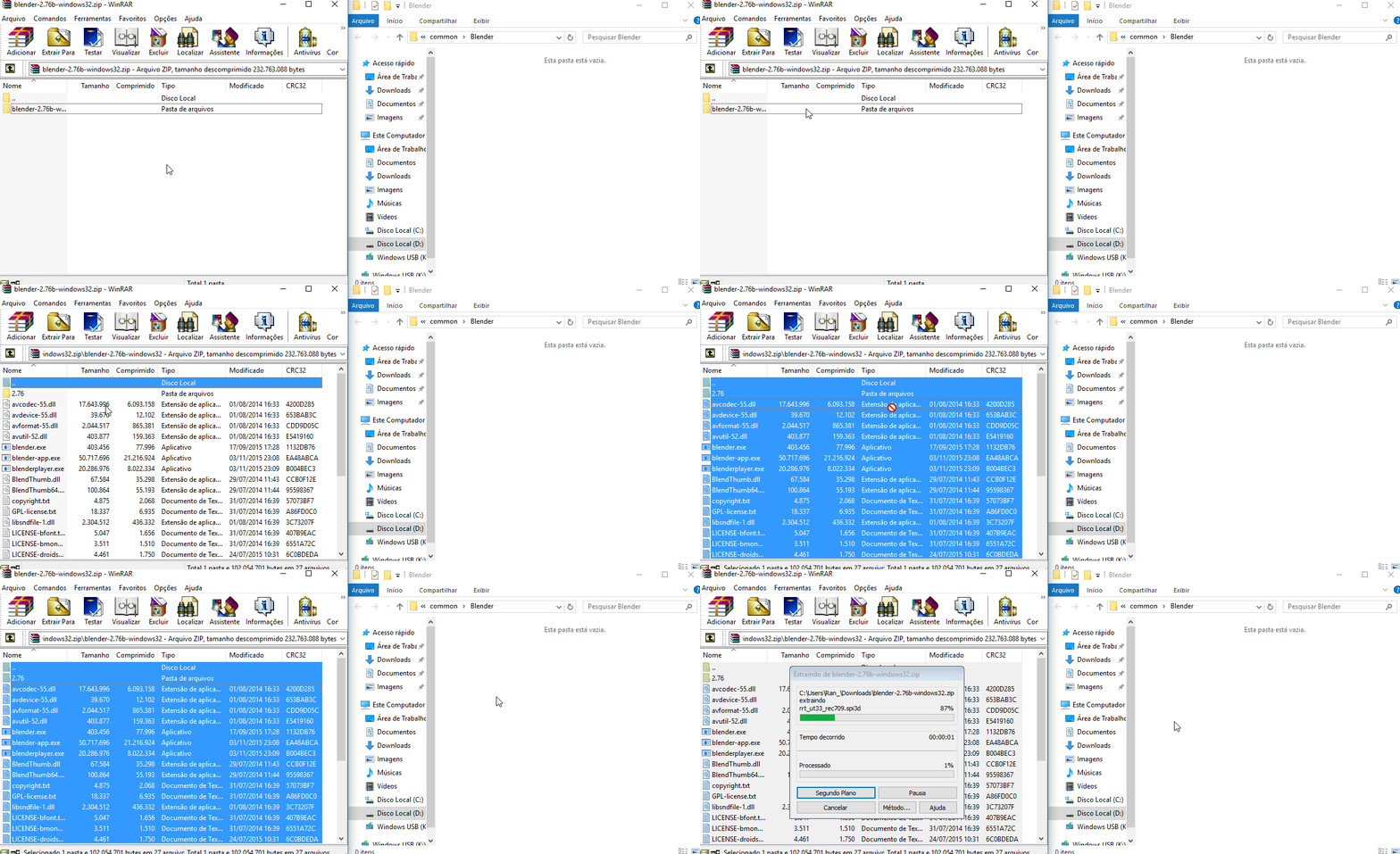
2 → Take the file of the older blender's version you downloaded and extract all the files in the directory you deleted the steam version of Blender
Pegue o arquivo da versão do Blender mais antigo que você baixou e extraia todos os arquivos no diretório que você excluiu a versão Steam do Blender

Gif:
.
.
.
Done | Feito
Once you have done all 2 steps, just start the blender on steam normally
Uma vez feito os 2 passos, inicie o Blender no steam normalmente

Make sure to backup the file you downloaded of the older version, it is possible that when there is some update of the Blender, it will replace the files of the version that we have just replaced
Certifique-se de fazer um backup do arquivo da versão antiga do Blender que você baixou, é possível que, quando houver alguma atualização do Blender, ela substituirá os arquivos da versão que acabamos de substituir

Was this guide helpful? Then rate it up and if possible save it as favorite
Este guia foi útil? deixe o like, e se possível, favorite o guia
4 条留言
João Bennington ®  [作者] 2024 年 2 月 14 日 上午 5:29 
Thanks for the feedback man, just now I noticed that they removed version 2.49 beta, I hope they change that because it was the only version that works on my machine.
This tutorial really helps a lot with this issue! bye :steamthumbsup:
Mort Brain 2024 年 2 月 13 日 上午 5:59 
Thanks for letting me know where I can get all of the Blender versions ever released.
João Bennington ®  [作者] 2019 年 10 月 4 日 上午 2:33 
Yes, but if the user wants a version earlier than 2.77
Carlton 2019 年 10 月 3 日 下午 10:07 
You could just go to betas in properties and change it from there.